MacUncle Airmail Converter

(Average Rating 4.6 Based on 1827 Reviews)

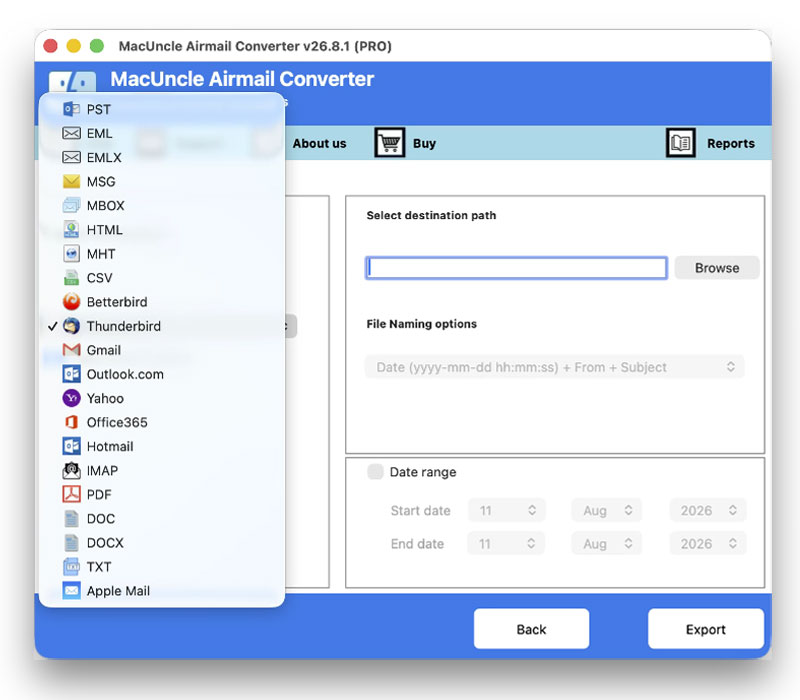
Airmail Email Converter is a dedicated tool to convert Airmail emails into widely used file formats including PST, PDF, EML, MSG, MBOX, HTML, DOC, etc.

  • Export Airmail Emails to 12+ File Formats
  • Migrate Emails to Outlook or other Email Client Directly
  • Convert Multiple Mailbox Folders in One Operation
  • Preserves Folder Hierarchy and Mailbox Structure
  • Maintain Email Metadata and Formatting
  • Filter Emails by Date Range for Select Convert Option

Convert Airmail Emails in 3 Simple Steps

MacUncle Airmail Converter is engineered for simplicity; no technical expertise is required to migrate email data.

Install & Load Airmail Data

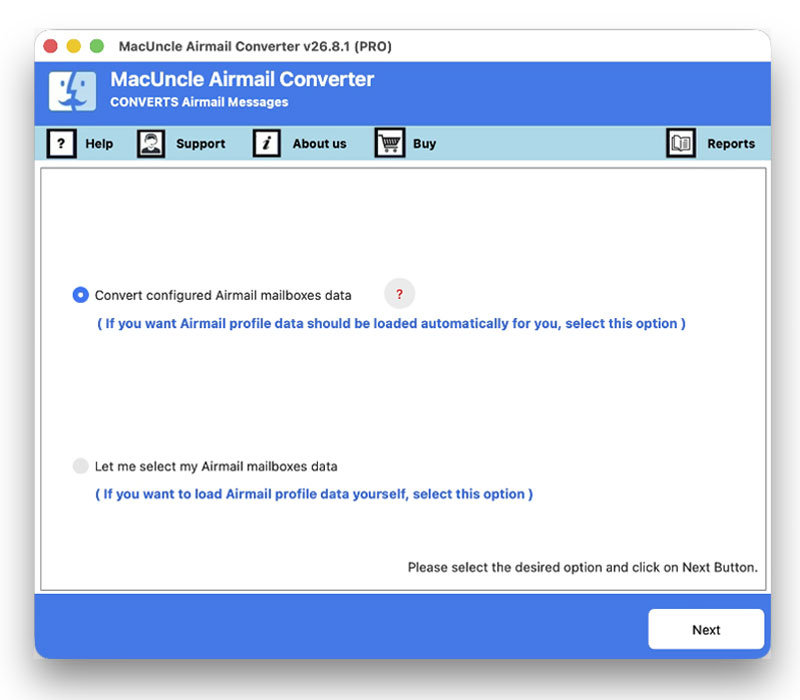
Download and install the Airmail Converter on Mac OS. Launch the software and add Airmail data using the options. Press the Next button to move further.

Choose an Option

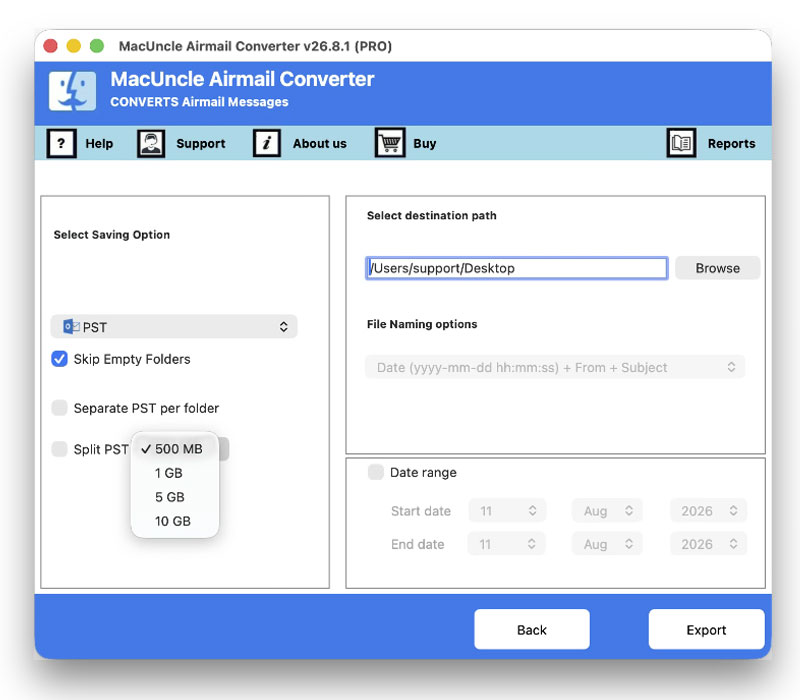
Now, select the export format from the list – PST, PDF, MBOX, EML, HTML, CSV, and more. Use the Browse button to choose a location to export Airmail emails.

Convert Airmail Emails

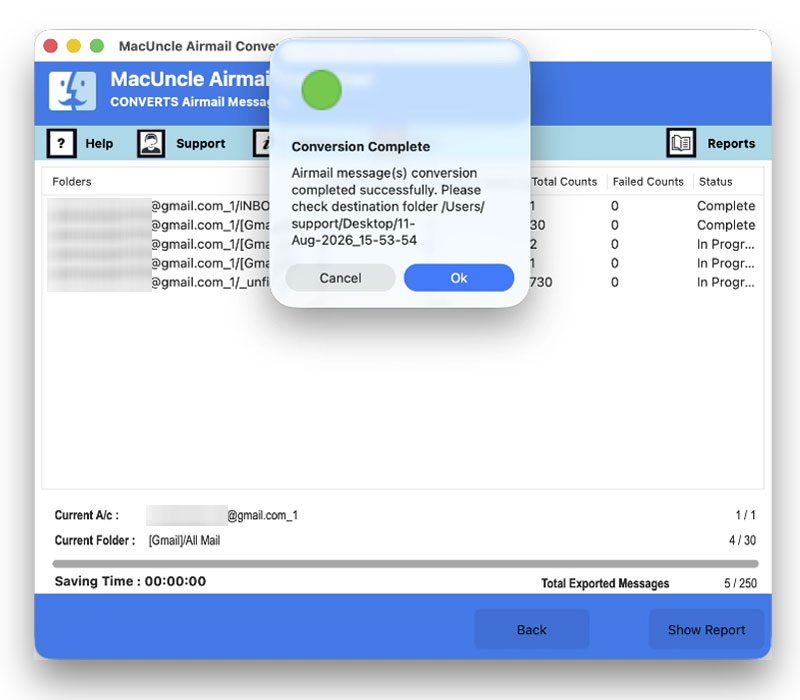
After configuring the settings, press the Export button to start the Airmail conversion. The tool displays a real-time process and notifies upon completion.

Why Use Airmail Converter Tool?

Quick and Hassle-Free Airmail Migration

Airmail Migration

When switching from the present email application, Airmail, to another due to business or by personal choice. During the switch, it is important to have access to previous emails and attachments. With MacUncle utility, migrate from Airmail to the desired email application without any loss of data.

Accessing Emails Without Airmail

The case is quite common wherein there is no need for email application, i.e. Airmail, and to view emails for any purpose; in such circumstances, one may wish to convert them into other common file formats, such as MBOX or any document format - PDF, DOC, or TXT. View your emails by opening the resulting file in any application.

Long-term Email Archives

If you are an organisation that needs to preserve its crucial emails for many years, Airmail Converter comes in handy. One cannot maintain their emails for a long period just by relying on any single email application; converting the important emails to a popular format helps in long-term archives.

Sharing Emails in Standard Formats

Sharing emails directly from the Airmail default format can be challenging when the recipients are not using the same application. The Airmail Converter tool enables to convert the selected emails into widely supported file formats to send emails more easily to clients, legal team, and co-workers.

airmail converter

Accurate Airmail Conversion with Original Formatting

Efficiently Convert Airmail Emails While Preserving Mailbox Structure

The Airmail Converter will help you export and migrate email data, and it retains the original mailbox structure. While converting the emails, the tool maintains original email properties, i.e. Sender and Recipients details, subject lines, attachments and folder structure of emails. If you are looking to take a backup of emails, change your email provider or just need to save the emails into other formats.

The tool includes several capabilities to simplify the mailbox conversion process.

  • Automated Database Discovery
  • Smart Date Range and Subject Filters
  • No Mailbox Size Limitations
  • Customization as per User Requirements

Advanced Features of Airmail Converter

Learn About the Powerful Features of the Airmail Converter for Mac

Batch Conversion of Airmail Emails

Use the MacUncle Airmail Converter to export single or thousands of Airmail emails at once. Use the two different Add buttons to add the emails from the Airmail location in batches without any manual intervention.

Retains Airmail Email Metadata

While converting or migrating emails from Airmail, the email components are kept intact, that is, To, From, Cc, Bcc, Date, Time, Subject, Inline Images, Signatures, HTML formatting, and folder hierarchy. Nothing from the email gets lost or altered during the conversion of Airmail emails.

Manage Large Mailboxes with Ease

Airmail Converter helps to simplify mailbox management by enabling bulk conversion of email folders and messages. Save time, reduce manual effort, and provides an organised approach to handle extensive email archives.

Selective Airmail Email Conversion

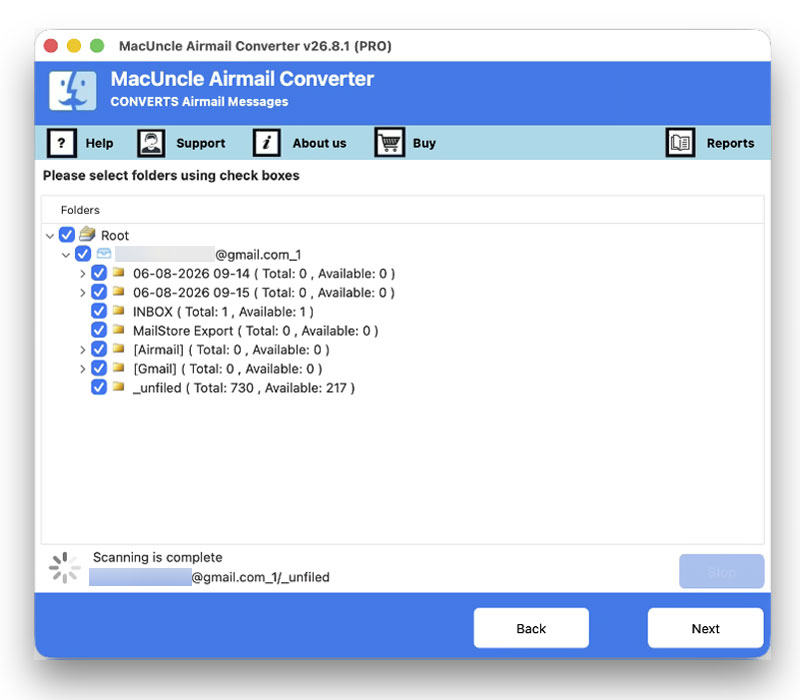
If there is no need to export all the emails, choose the desired folder before the conversion begins. Select the specific mailboxes, folder or individual emails from the data tree. The Airmail converter gives full control over what gets converted and what emails to skip.

Preserve Folder Structure

The original folder hierarchy, including Inbox, Sent, Drafts, Trash and other custom folders, is preserved in the output exactly as it was. The Airmail Converter ensures effortless migrations to the target email client while preserving the folder structure.

Multiple File Naming Options

With the file-naming option, organise the exported files the way users want. Choose a file naming pattern based on Subject, Date, Time, Auto-Increment numbering, etc. It is ideal for a professional document management workflow.

Compatible with all macOS versions

Airmail Converter for Mac works seamlessly on all Mac Computers – MacBook, iMac, Mac Mini – from macOS 10.10 Yosemite all the way through macOS 26 Tahoe.

Airmail Conversion Log Report

After every export of Airmail conversion, the tool generates a detailed SavingLog.txt file that records the Start Time, Saving Format, Destination, Per-folder item counts, etc. Get the full details of the conversion every time the conversion is done.

Software Specification

Minimum System Requirements to Launch the Airmail Conversion Tool

Convert Airmail Emails and Mailboxes in Bulk

Version: v26.1.1
Size: 166.34 MB
Release Date: June, 2026
Software Download: Download Now Download Now


Trial Limitations: Demo version of the Airmail Converter is a free version that includes all the vital features to understand what the tool can do by allowing a free conversion of 25 files. Select any saving option and test the tool before getting the upgraded version.


Hard Disk Space: 400 MB of free hard disk space required
RAM: 512 MB of RAM (1 GB is Recommended)
Processor: Apple Silicon M-series (M1 or later)


Platforms: macOS 26 Tahoe, macOS 15 Sequoia, 14 Sonoma, 13 Ventura, 12 Monterey, 11 Big Sur, 10.15 Catalina, 10.14 Mojave, 10.13 High Sierra, 10.12 Sierra, 10.11 El Capitan, and 10.10 Yosemite.


Product Guide: Software Guide   Installation   Uninstallation   EULA  


Fast and Secure Airmail Mailbox Conversion Workflow

Open any image to view the complete visual tutorial

add airmail data
choose an option
set a location
start airmail conversion

Software Feature Comparison Airmail Converter

Understand the Difference Between Freeware and Pro Version of Airmail Converter

Features

Trial Version

Full Version

File Conversion Limit

25 Items / Folder

Unlimited

Export multiple Airmail Mailboxes at once

Export in all 10+ Email Formats (PST, PDF, MBOX, EML, MSG, HTML...)

Folder Structure Preservation

Preserve Email Metadata information

No Airmail File Size limitations

File Naming Conventions

Custom Modifications Available

Supports all macOS versions

24*7 Free Technical Support

Price

Free

$39

 Download

 Buy

See How to Convert Airmail Emails in a Few Clicks

Watch the detailed tutorial for exporting Airmail data to your desired format.

We Specialize in Assisting Customers

Check Ratings and Reviews of Airmail Converter.

Performance

90%

Customer Satisfaction

93%

Output Accuracy

100%

Frequently Asked Questions

Find Answer Here Regarding Mac Airmail Converter

Download & install MacUncle Airmail Converter. Follow the given steps:-:

  1. Run the software & load Airmail data.
  2. Select output file format.
  3. Set file naming convention and choose destination location.
  4. Press the Export button. The software starts to convert emails.

Once the conversion completes, the output folder is automatically opened, which contains the converted files of Outlook emails.

The Mail application data is located within the macOS application container:


~/Library/Containers/it.bloop.airmail2/Data/Library/Application Support/AirMailLab

Emails are located there in .eml and .emlx format. The Airmail Converter can automatically detect and choose the path for emails, and they can also be browsed manually.

Yes, the software is fully compatible with macOS 10.10 Yosemite to macOS 26 Tahoe and macOS 15 Sequoia.

Yes, the software also supports migrating directly to Gmail/ Yahoo or other IMAP servers through the tool by specifying the account credentials, and transfers the emails to your desired webmail service without an intermediary file.

What Customers Are Saying

Airmail Converter Full Version Users Reviews