The Rackspace Backup Wizard is a powerful and reliable solution that helps users to securely export and back up email data with ease. It enables users to download complete Rackspace mailboxes - including emails, contacts, calendars, etc. into a wide range of file formats.
The Main 3 Steps of Rackspace Backup Tool to Take Backup within a Few Minutes
Install the Tool
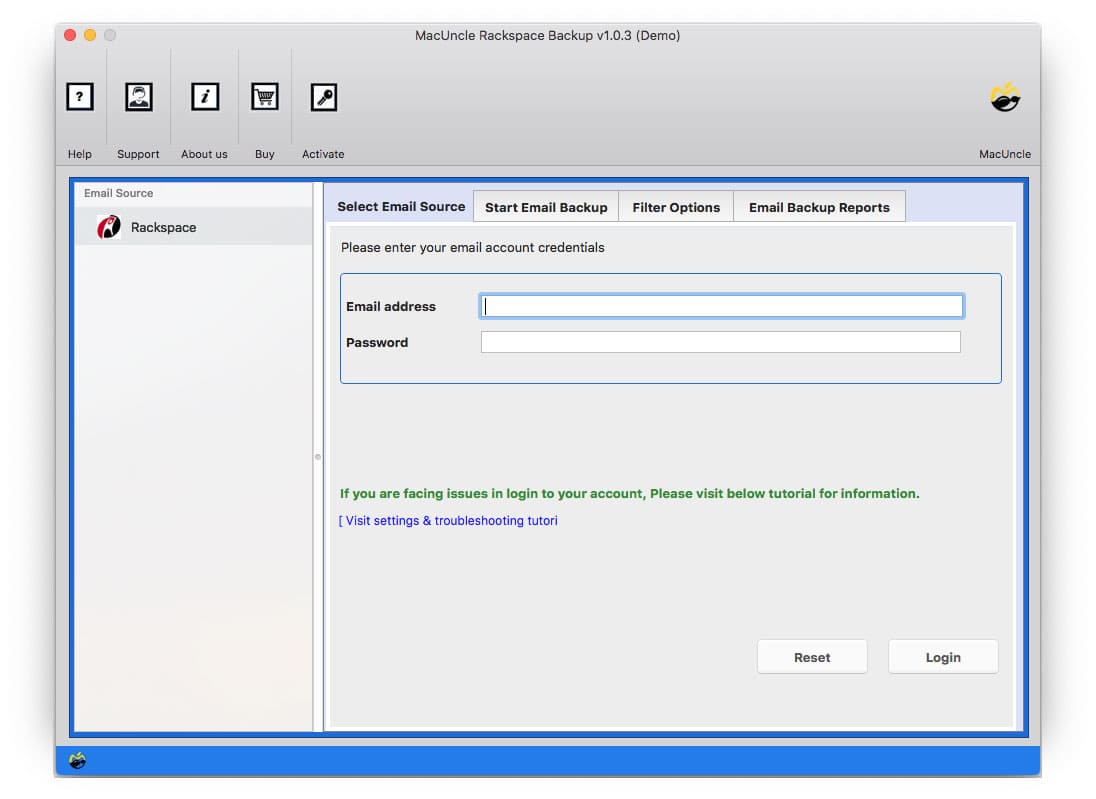
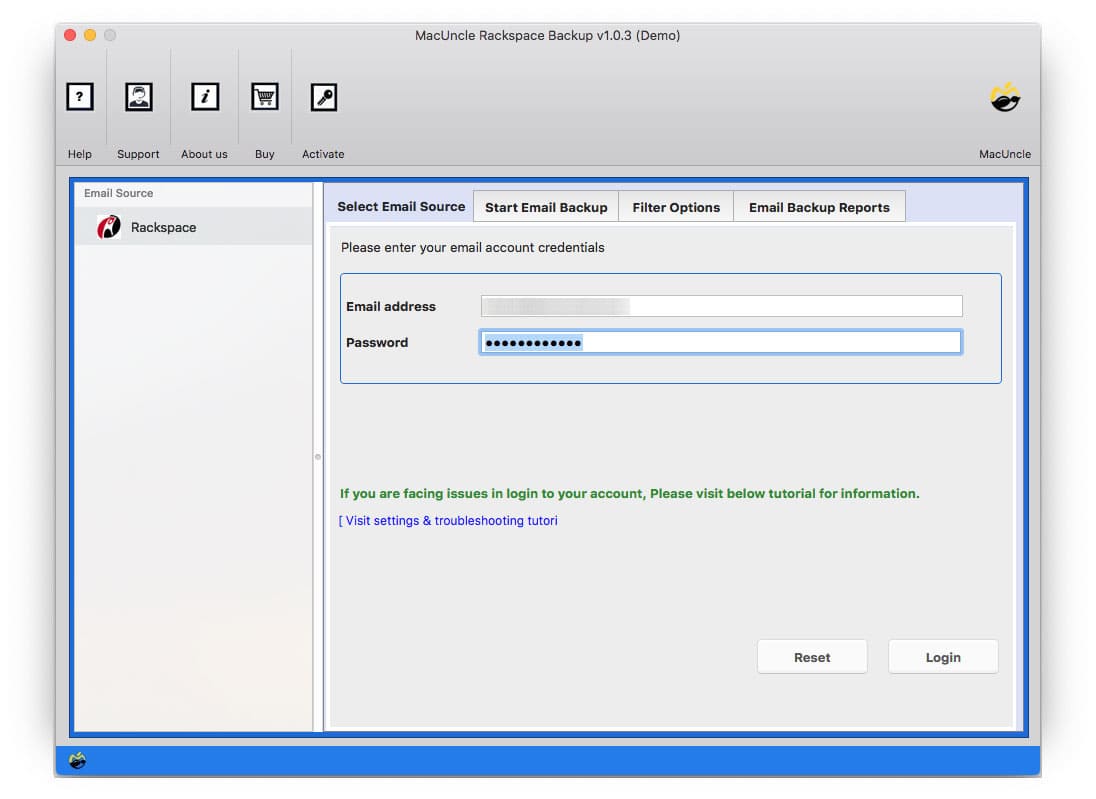
Start off by downloading the Rackspace backup tool on Mac and install the tool within a few minutes. Enter Rackspace Email address and password to the software panel. Hit the Login button to proceed.
Select Desired Saving Option
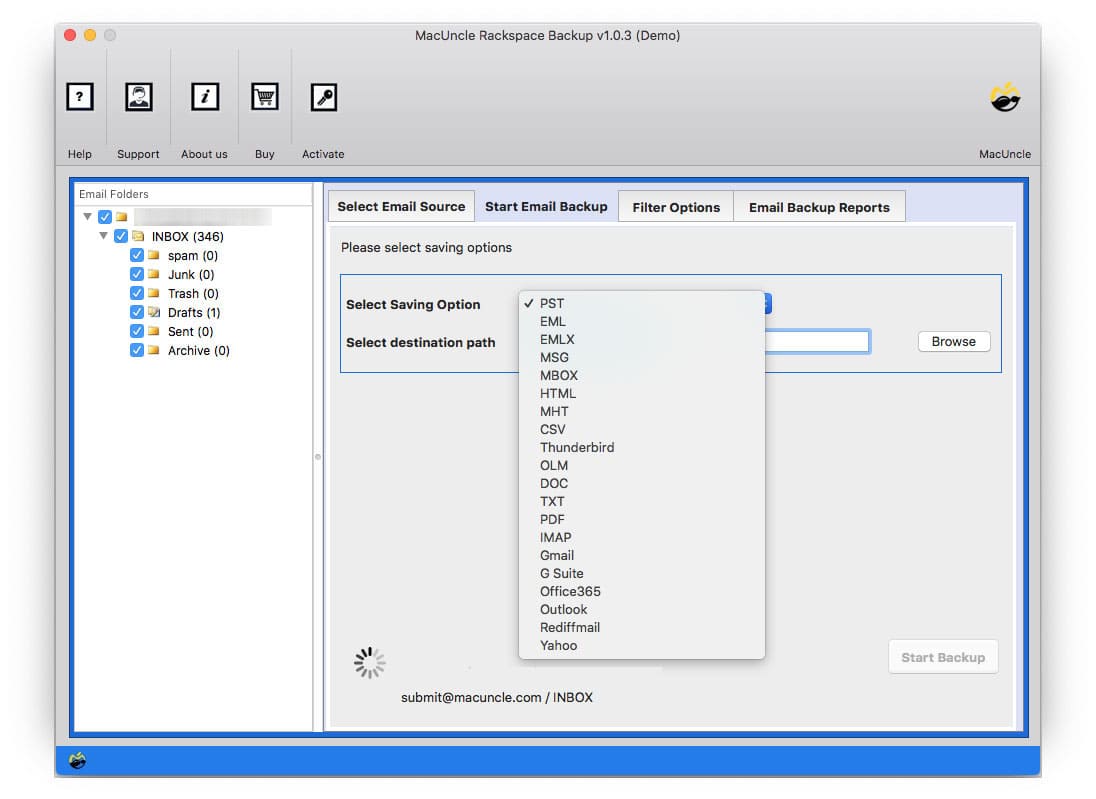
Soon the tool loads all the Rackspace email folder in the panel and selects the desired option from Select Saving Option. Choose any email file format or mail client as per the requirement. Then press Start Backup
Get the Result
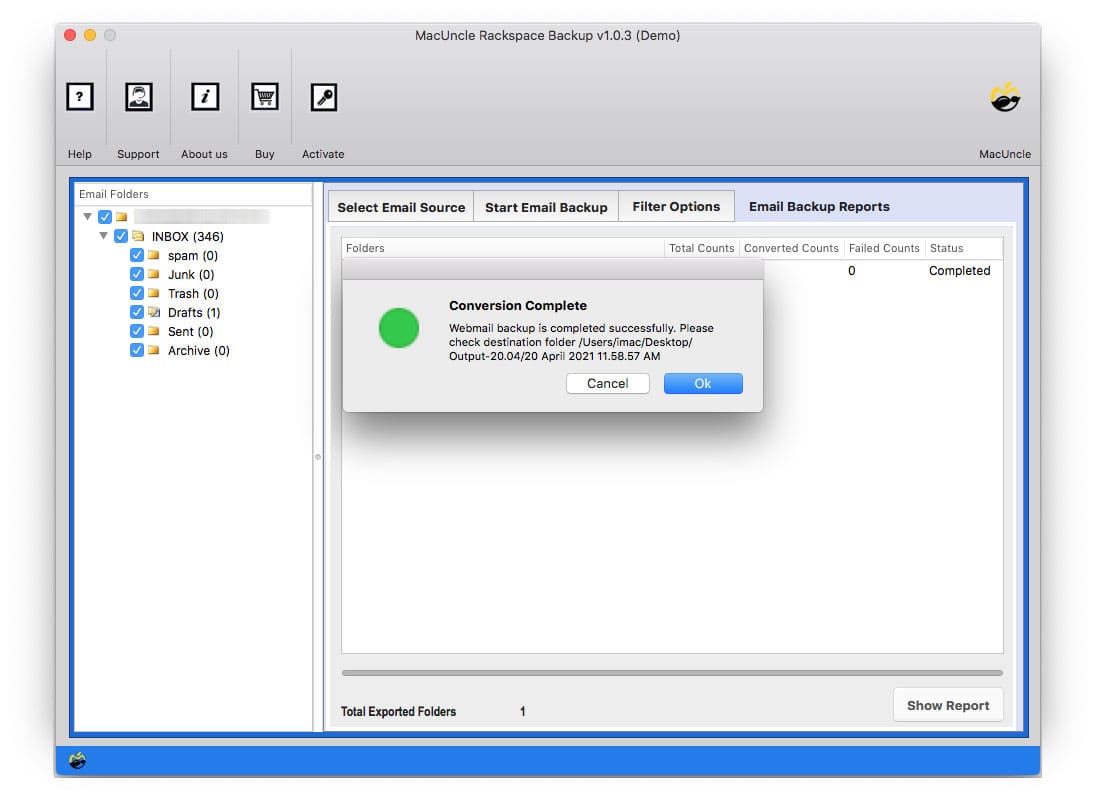
As a result, the tool starts the backup process, and, in a few minutes, you will get the solution. A few notifications display on the screen and the location where the resultant file is stored pops up.
Read Software Features to Save Rackspace account on Mac OS X Professionally
Backup Rackspace Mailbox in Multiple Format
You can select the formats of files to retrieve your Emails from the Rackspace Mail. Rackspace Backup Tool has the option to export e-mails to different email clients too. Rackspace e-mails can also be imported directly to Thunderbird, Lotus Notes, and Windows Live Mail.
Complete Backup of Rackspace Mail
Rackspace Backup Solution for Mac is one of the easiest to download a local device from several Rackspace Email Accounts. The software uses sophisticated programming algorithms to import whole mailboxes for Rackspace on a Mac-based system. Not only does the application import emails from the Rackspace Inbox folder, but all Rackspace files like Inbox and outbox, Send, Spam, and Trash are also available for download.
Save Rackspace Emails to Document Formats
Rackspace email backup is an easy-to-download e-mail to Document and Word processing tools on Mac OS Computer. After using the program, Rackspace emails for several devices and platforms can be easily saved in Adobe PDF, HTML, DOC, etc. formats.
Maintain Folder Hierarchy of Rackspace
You can export Rackspace e-mail in several e-mail formats with the software. The Mac software is intelligent enough to maintain the hierarchy on the Rackspace during e-mail migration/conversion. This utility uses advanced algorithms to keep the mailbox folder and subfolder hierarchy. You will get the exact copy of the hierarchy of the Rackspace Folder to your respective location after the process is completed.
Email Filter Option
We also have an option for this if you want to get the whole backup in selective manner. The app will pick the folder you want to download from the Rackspace Webmail after the filter options as setup. However, Advance filter options (such as via date range, subject name, cc, and bcc) are also included in the software to download emails from Rackspace by user requirements.
Backup Rackspace Emails on Mac OS
The Rackspace Backup Mailboxes tool download emails from Rackspace to the local computer in a broad variety of formats on all versions of the Macintosh Operating system such as macOS 26 Tahoe, macOS 15 Sequoia, 14 Sonoma, 13 Ventura, 12 Monterey, 11 Big Sur, 10.15 Catalina, 10.14 Mojave, 10.13 High Sierra, 10.12 Sierra, 10.11 El Capitan, and 10.10 Yosemite.
Overview of Rackspace Mailbox Backup Tool Mac Features – DEMO and Licensed Version
Efficient Rackspace Email Backup Solution
| Version: | v1.0.5 |
| Size: | 21.9 MB |
| Release Date: | March, 2026 |
| Software Download: | Download Now Download Now |
| Trial Limitations: | MacUncle Rackspace Backup Wizard Trial version enables you to save up to 25 Mac OS Mail from various email applications to a selected format, making it easy for users to search for their benefits. |
| Hard Disk Space: | 400 MB of free hard disk space required |
| RAM: | 512 MB of RAM (1 GB is Recommended) |
| Processor: | Apple Silicon M-series (M1 or later) |
| Platforms: | macOS 26 Tahoe, macOS 15 Sequoia, 14 Sonoma, 13 Ventura, 12 Monterey, 11 Big Sur, 10.15 Catalina, 10.14 Mojave, 10.13 High Sierra, 10.12 Sierra, 10.11 El Capitan, and 10.10 Yosemite. |
| Product Guide: | Software Guide Installation Uninstallation EULA |
Review the software screenshots to understand its user-friendly design.
Understand the Benefits of the Free and Premium Editions
|
Features |
Trial Version |
Full Version |
|---|---|---|
| Email Backup Capacity |
25 Emails |
Unlimited Emails |
| Backup Rackspace Emails to PST, MBOX, EML, MSG, etc. |
|
|
| Export Rackspace mailbox to PDF, TXT, HTML etc. |
|
|
| Preserves Email Properties and Folder Structure |
|
|
| Selective Email Backup using Filters |
|
|
| Backup Multiple Rackspace Mailboxes |
|
|
| Free 24*7 Technical Support |
|
|
| Priority Technical Support |
|
|
| Software Customization for Advanced Backup |
|
|
| Full Access to All Backup Features |
|
|
| Price |
Free |
$29 |
Follow the Steps to Backup Rackspace Email Account
We Specialize in Assisting Customers
Check Ratings and Reviews of Rackspace Backup Wizard.
Performance
93%
Customer Satisfaction
93%
Output Accuracy
100%
Frequently Asked Questions
Steps for Rackspace export to PDF file are as follows;
Done! This is how you can export Rackspace Mailbox to PDF documents.
Yes, you can easily backup Rackspace account along with the attachments.
Yes, with the software, you can easily backup selective email using the “Filter Option” which comprises of Data, Subject, To, From, etc.
Yes, of course, the tool is compatible with all the macOS 10.10 Yosemite and above versions.
Customer Feedback
Rex
UK
Very easy to work on. I first tried the demo edition of the application and then got this Standard upgraded version. It is operated quite right within incredibly little time. I've moved all my old Rackspace account data to Office 365 Outlook account. Everything was easy since I didn't have much to do to migrate the emails.
Kate
USA
This is to be admitted that Rackspace Backup Tool for mac is indeed the best email files downloader tool for Rackspace. The interface, the self-guided feature, the quick solution, and so on of this tool do put forward the best application to utilize.
James
Canada
I have been using this tool for over a year. It does its job well that it. All these options are really helpful when it comes to saving the data directly from the Rackspace account. I first used this tool to migrate from Rackspace to G Suite.