How to Convert DBX to EML Securely Without Losing Data?


Summary: Users can convert DBX to EML with manual and professional techniques easily. This blog will help you as the best guide to use the DBX to EML Converter to securely convert the DBX files while maintaining the data integrity with ease.
You may have DBX files saved with you if you have used Microsoft Outlook Express earlier. As these files cannot be opened easily and you may require a supporting platform. This may lead to converting DBX files to a compatible file format that can be opened across multiple platforms with all the preserved data.
Several users choose to convert DBX to EML, as EML is a standard file format to open all the emails easily. It behaves like a digital email platform that contains and shows all the original email attributes. In this blog, we will explore the step-by-step guide to complete the process, along with the reasons and important scenarios.
Why Convert DBX to EML?
A user should know what are the reasons behind converting DBX to EML. Here are the common reasons to convert DBX to EML:
- Discontinuation of Outlook Express: Outlook Express was discontinued many years ago. Some users can’t have access to Outlook Express, which creates problem for users to view emails which are stored in DBX files.
- Better Compatibility: The DBX files work only with Outlook Express, whereas EML files can be accessed through multiple email clients such as Mozilla Thunderbird, eM Client, Windows Mail, and Apple Mail. This makes the EML files more flexible format than DBX.
- Access Individual Emails: DBX files can store multiple emails in a single file. It can be difficult for users to access a particular email.
- Reduce Dependency on Old Structure: If the users’ emails stay in the DBX format, they can’t open DBX files without Outlook Express. By converting DBX files to EML, you can make your emails independent of Outlook Express.
Prerequisites for Converting DBX to EML
Before converting the EML files, the user should check these things:
- Enough Storage Space: Check if there is enough storage space to store the converted EML files on your computer, especially if you are converting large emails.
- Access to DBX Files: Store the DBX files that contain Outlook Express emails.
- Backup Data: Make sure to save a backup of the original DBX files before conversion.
- Check File Health: Before the conversion process, check that the DBX files are not corrupted or damaged.
- Choose a Reliable Converter: Choose a trustworthy conversion tool to convert DBX to EML securely.
Manual Methods to Convert DBX to EML
Below are the manual methods to convert DBX to EML:
1: Using an Online Converter Tool.
DBX to EML online converter tool allows users to upload the selected DBX files to website and download the converted EML files without installing the software.
- Search for DBX to EML Converter on a search engine, and open any online converter tool.
- Upload the selected DBX file which you want to convert.
- Click the Convert button to start the conversion process.
- Once the conversion is completed, download the converted EML files on computer.
2: Import DBX into Thunderbird.
This method works when Outlook Express is unavailable. Follow the steps below to convert the DBX files.
- Install Mozilla Thunderbird on your computer.
- Go to Add-ons and Themes.
- Install the ImportExportTools NG.
- Use the add-on to import Outlook Express mailbox data.
- Select the imported folder and right-click on it.
- Choose the Export All messages and then select the EML format.
Limitations of Manual Methods.
Although manual methods are free of cost but they often need multiple complicated steps to convert the DBX files, and it is also time-consuming method.
Here are the limitations of the manual method to convert DBX to EML files:
- No Folder Structure Preservation: Email folders and hierarchy may not be maintained correctly after the conversion is completed.
- Risk of Data Loss: While converting DBX to EML with the manual method, the user’s important email information, attachments or formatting may be lost due to any reason.
- Bulk Conversion Not Possible: User must convert the DBX files individually, they cannot convert the files in bulk.
- Need Technical Knowledge: The manual method requires technical knowledge to convert DBX to EML, which is confusing for non-technical users.
- Time-Consuming: The manual method needs multiple steps to convert the DBX files, which often takes a lot of time for users to complete the conversion process.
Professional Method to Convert DBX to EML
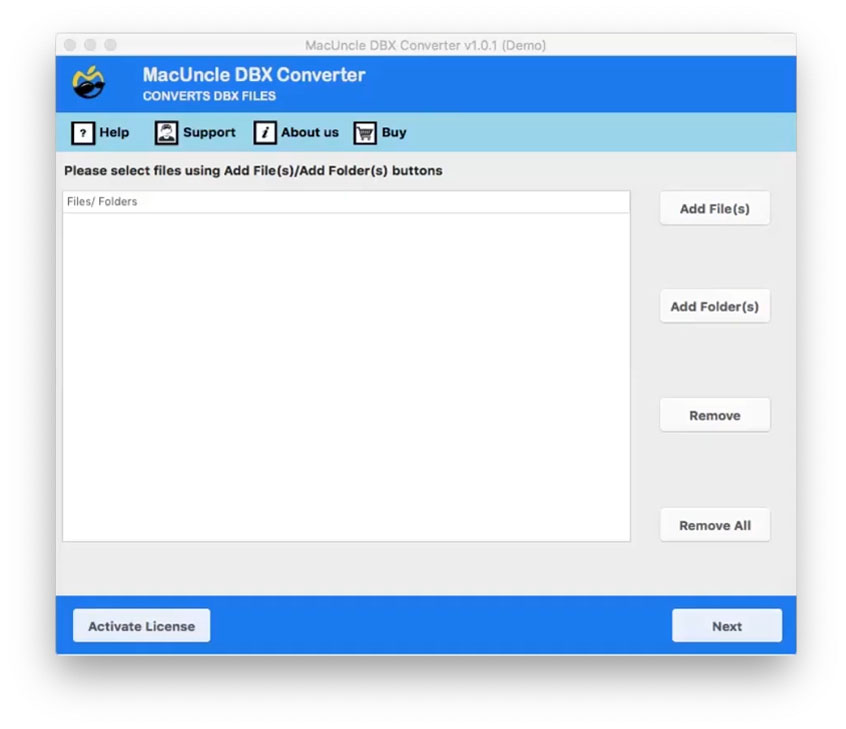
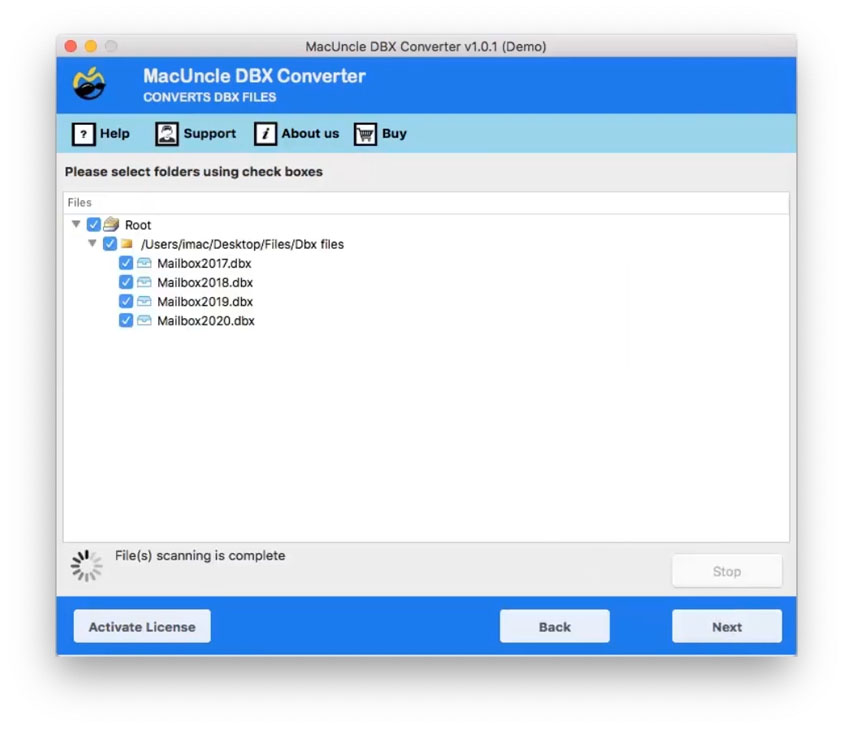
While the manual method can be used to convert DBX to EML, it has certain limitations which can make the process complicated for users. It is time-consuming, especially when dealing with the large mailboxes, requires technical knowledge, and is not secure for important data. Consequently, most IT professionals prefer using MacUncle DBX Converter, as it is both secure and maintains the email formatting, attachments, and metadata while converting the file. Below is the step-by-step, easy guide to convert DBX to EML with a dedicated professional solution.
Here are the steps to follow to convert DBX to EML:
- Install the DBX to EML Converter on computer.
- Select the DBX files, or you can select the folders.

- Check/Uncheck the required folders to convert.
- Select the EML format from the saving options.
- Choose the preferred location to store the converted files.
- Select the file name with File Naming Options.
- Click the Convert button to start the conversion process.
Effective Features of DBX to EML Converter
This professional converter tool has many advanced features, which can help you to convert DBX to EML easily and securely.
Here are the core functionalities of the DBX to EML Converter:
- 30+ Formats: This converter tool can convert DBX to PDF, MSG, EML, EMLX, TXT, MBOX, HTML, MHT, DOC, CSV, PST, Maildir, Thunderbird, Gmail, Outlook, Yahoo, Office 365, IBM Verse, Amazon WorkMail, Exchange Server, Hosted Exchange Server, G Suite, etc.
- Converts Large Files: Many email files can be very large in size, but this software can handle large DBX files without imposing a file size limit.
- File Name Options: DBX to EML Converter provides users to rename the converted files by giving them multiple file naming options, such as subject, time, date, and other combinations.
- Independent Utility: It is an independent software, that does not require Outlook Express or any other third-party email program to be installed.
- Choose Location: Users can choose the destination to store the converted files.
Post-Conversion Checklist
After the conversion process is completed, follow the steps below to make sure everything is working correctly:
- Verify that the original mailbox folders and email organizations have been preserved after the file conversion or not.
- Users should maintain a backup of the original DBX files and keep them till they confirm the conversion was completed.
- Manage the converted EML files for better control and easy access.
- Check the email details, such as email content, receiver, and sender are displayed correctly. Verify the email attachments, such as images, PDFs, and documents, are present and can be opened.
- Open a few converted EML files to confirm the emails are readable and complete.
FAQs
Q1. Can Outlook open DBX files?
Microsoft Outlook cannot open a DBX file directly because the file format is used by Outlook Express. Users require to convert the DBX file into PST or EML format to open them.
Q2. How to convert to EML format?
To convert DBX to EML format, you have to install the DBX to EML Converter and select the file or folder as per your requirement, select the EML format from the saving options, and then choose the desired location to store the converted EML files. At the end, choose the file name as required, then click the convert button to start the conversion process.
Q3. How to read DBX files without Outlook Express?
You can use the DBX viewer to open and read DBX files without installing Outlook Express.
Q4. Are .msg and .eml the same?
No, both store the email messages, but they are in different formats. MSG files are used by Microsoft Outlook, while EML files are supported by many email programs, such as Windows Mail, Outlook and Thunderbird.
Q5. Is Outlook Express being discontinued?
Yes, Outlook Express was discontinued many years ago, and it is no longer supported on modern Windows operating system that is why users need to convert the DBX files to have access to their old emails.
Conclusion
In conclusion, this blog explains the reasons behind converting the DBX to EML, manual methods to convert DBX to EML files, which is not a secure way, and it is also a time-consuming task. This is why we provide a professional solution, which is used globally by IT experts. The expert preferred DBX to EML Converter. Additionally, this software allows users to convert files in bulk without losing data, which you can save at any desired location to organize the files properly. However, if you still have any queries regarding how to convert DBX to EML or you want to know more about the above-suggested converter tool, then you can contact our support team, they are 24/7 available for resolving your queries.