Batch convert EMLX files to PST, MBOX, EML, MSG, PDF, HTML & CSV with attachments intact. Works on Mac and Windows. Try the free EMLX Converter.
Convert EMLX Files in Three Simple Steps
Install & Add EMLX Files
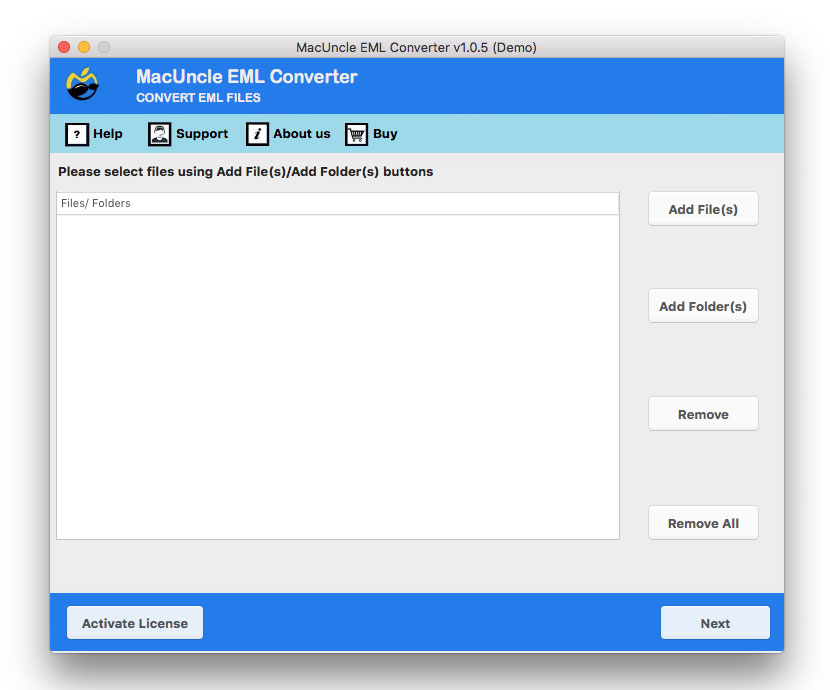
First, download and install the required version of the Mac EMLX Converter. Launch it and add the .emlx files from the system using the Add File(s) or Add Folder(s). Now, use the checkbox to tick the mailboxes.
Choose Export Option
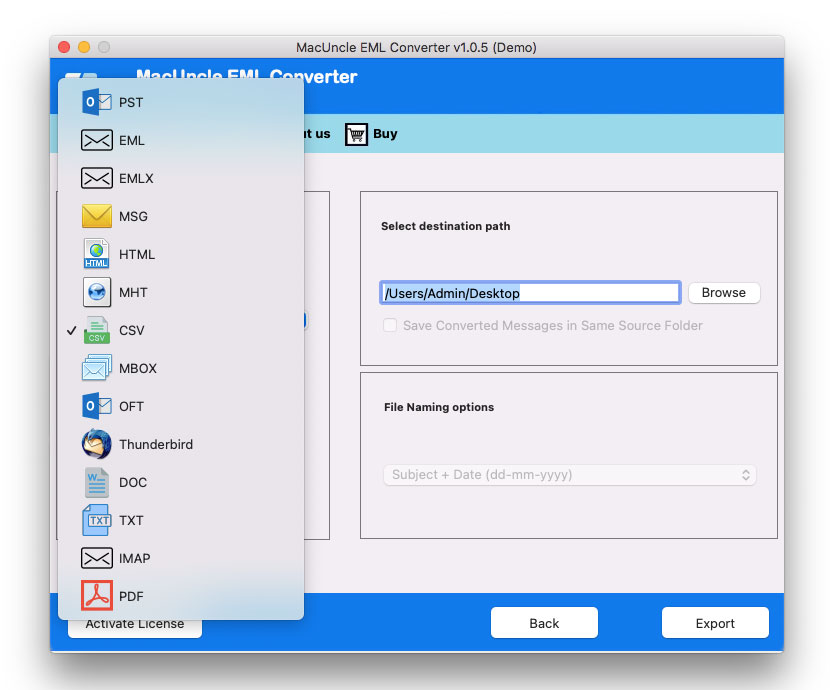
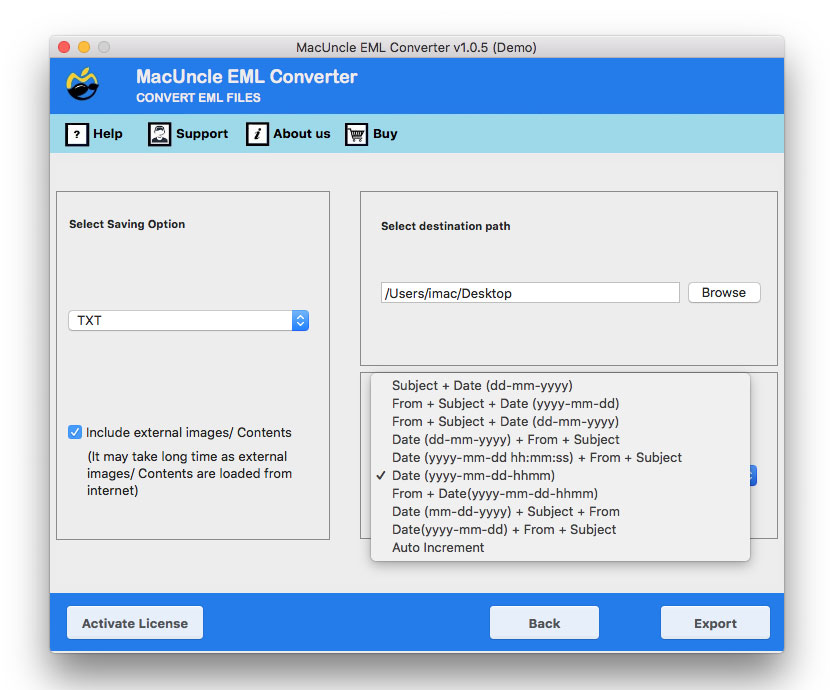
Now, select any of the file formats or IMAP migration options from the Select Saving Option. Set a file naming option and a destination location to store the final converted EMLX files.
Convert EMLX Files
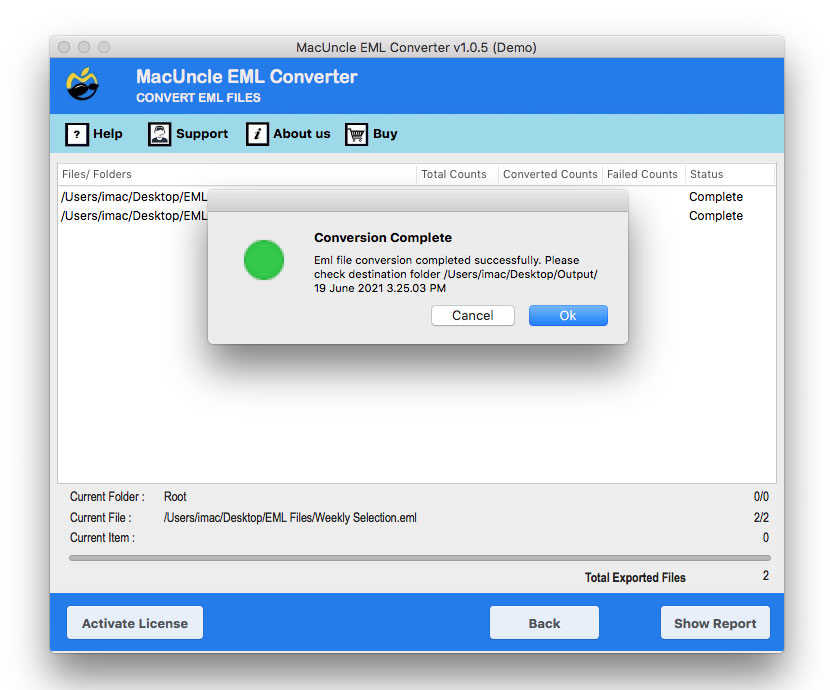
Click the Export button to start the conversion. The tool will show the live progress for every file conversion and notify the user once the conversion is finished. A log report and the folder with the converted files open up.
How Different Users Put the EMLX Converter to Work
Home / Personal Users
Want to move from a Mac to a Windows PC? Convert EMLX Files to Outlook PST and migrate years of personal emails to Microsoft Outlook directly. It makes it easy to access the existing emails on new the computer.
IT Administrators
Migrating email to new computers or platforms? Transfer individual emails to different email platforms or convert complete EMLX folders in batches - the tool is perfect for admins. Process multiple EMLX Files at once.
Legal & Compliance Teams
Need to retain email copies for record keeping, review or compliance? Save EMLX emails to PDF files with original email data. PDF copies of the EMLX email can be viewed, shared, printed, etc. as needed.
Small Businesses
Want to import EMLX files to another email account? Migrate EMLX emails to Gmail, Yahoo Mail, Yahoo, Thunderbird, Outlook, etc. Easy migration of EMLX file to different desktop or web-based email accounts.
Find out everything you need to know to convert EMLX files quickly and accurately.
Convert or Migrate EMLX Files
EMLX Converter can export files to PST, MBOX, EML, MSG, HTML, MHT, TXT, DOC, etc. or migrate EMLX emails directly to email clients and services. It provides flexible options to move EMLX files to any option as per the user’s needs. Whether you need to open EMLX emails in another email client or save them in document format.
Batch EMLX Conversion
Add EMLX files using two options, either use Add File(s) to pick individual .emlx emails or Add Folder(s) to load complete mailboxes from the folder with all the messages. Convert one message or thousands of EMLX files and folder in a single run. There is no need to process emails one by one, and save the time with batch conversion.
No Email Client Required
There is no need to have any email client installed or configured to use the tool here. The EMLX Converter works directly on the files, which is ideal when there are EMLX files as the backup copy. The original email account or setup is not required. User can access and convert the saved EMLX files even if the original email account or setup is unavailable. This is useful if you need to view or process to view or process the backup EMLX files.
Selective Mailbox Conversion
After adding the EMLX, every mailbox is listed with a checkbox. Use the checkbox to tick only the folders you need, such as Inbox or Sent. This gives the user control over which mailboxes are included for the conversion. Avoid converting unnecessary mailbox data and save time with this.
Import-Ready Output
Converted files are saved in the standard layout of the destination application. That is, PST for Outlook, MBOX for Thunderbird, MSG and EML for Windows Mail applications, etc. Import the converted files directly without any additional fixing. The converted EMLX files offer the structure that is needed by the output format to make the email transition more user-friendly.
Keeps Email Properties Intact
The header details are preserved in the converted file as in the original EMLX file: To, From, Cc, Bcc, Subject, Date, and any inline images, links and font styles. The conversion preserves the file structure and contents of the EMLX file for message integrity. This allows the user to read or use these details without losing the information from the source EMLX files.
Preserves Folder Hierarchy
The original folder structure is well preserved. The hierarchy of the original mail folder & subfolders is recreated in the output for easy organisation of your emails. The structure helps to easily find particular emails after conversion, rather than having to work through them again from scratch.
Multiple File Naming Options
Select the file naming option for the converted message files, such as Subject, Date, From, or a combination of these from the EMLX Converter. The naming pattern makes it easier to search for and sort the exported emails. It is very useful when export email messages in bulk so you can find the email messages easily without opening the files.
Minimum System Requirements for the EMLX File Conversion Tool
Latest Release Details
| Version: | v26.2.2 |
| Size: | 236.68 MB |
| Release Date: | March, 2026 |
| Software Download: | Download Now Download Now |
| Trial Limitations: | Export EMLX to any email & document format. Convert 25 emails from EMLX to any other supported email or document format. The trial version allows you to examine the main conversion features and preview the output. |
| Hard Disk Space: | 400 MB of free hard disk space required |
| RAM: | 512 MB of RAM (1 GB is Recommended) |
| Processor: | Apple Silicon M-series (M1 or later) |
| Platforms: | macOS 26 Tahoe, macOS 15 Sequoia, 14 Sonoma, 13 Ventura, 12 Monterey, 11 Big Sur, 10.15 Catalina, 10.14 Mojave, 10.13 High Sierra, 10.12 Sierra, 10.11 El Capitan, and 10.10 Yosemite. |
| Software Customization | Customer Support |
| Product Guide: | Software Guide Installation Uninstallation EULA |
Go through each of the illustrated steps below to learn more about the EMLX Conversion process.
Compare the features available in the Free Trial and Full Licensed Version
|
Features |
Trial Version |
Full Version |
|---|---|---|
| Email Conversion Capacity |
25 EMLX Files |
Unlimited |
| Batch Conversion |
Limited |
|
| All Saving Options |
|
|
| Folder Structure Preserved |
|
|
| Email Metadata Preserved |
|
|
| Custom Save Location |
|
|
| Selective Mailbox Conversion |
|
|
| Multiple File Naming Options |
|
|
| No Email Client Required |
|
|
| Full Customer Support |
|
|
| Price |
Free |
$29 |
Watch the video below to follow the conversion process, from adding EMLX files to saving them in the required format.
Learn More About EMLX Conversion, Formats, and Features
4 Steps of EMLX Conversion:
Apple Mail stores each email as a .emlx file in ~/Library/Mail/V#/ (V10 for recent versions of macOS). The mailbox itself is a .mbox folder with a Messages sub-folder containing the EMLX files.
There is no limit to the size or number of EMLX files you can convert with EMLX Converter for Mac.
Yes. Add folders to load entire mailboxes (or folders) from the account and convert all EMLX files with one click.
Yes. Attachments are kept inside the email for email formats and saved alongside the output for document formats.
Yes. You can export EMLX messages to EML format to use with compatible email applications and platforms.
Yes. The header information, such as From, To, Cc, Bcc, Subject and Date, is retained in the converted emails.
Yes. Select specific mailboxes or folders for conversion instead of processing the entire data.
What Customers Are Saying
Daniel R.
United States
I wanted to import a few of my Apple Mail EMLX files to a format I could access on another machine. The conversion was simple, and I managed to export my emails without much fuss.
Sarah M
United Kingdom
I was importing my emails from Mac Mail to Outlook, and I wanted to convert EMLX to PST. I am glad I decided to use the software because it saved me a lot of time and effort that would have been spent on the manual conversion of each email.
Robert K.
Australia
Before I began the conversion, I thought I had hundreds of EMLX files to convert and didn't want to perform the conversion one by one. The batch conversion feature of the software helped me a lot to convert multiple files at the same time.
Thomas W.
Germany
I aimed to archive a few valuable Apple Mail emails as PDFs for future viewing. Thanks to the straightforward process of exporting the emails using EMLX Converter, I was able to save them as readable files.