Effortlessly convert Evernote ENEX files into multiple widely used formats, including PDF, DOC, DOCX, RTF, MSG, PST, JPG, GIF, and more, while preserving your data throughout the conversion process.
Convert Evernote ENEX, HTML, or MHT files using MacUncle's Evernote Converter within a few steps
Install the Tool
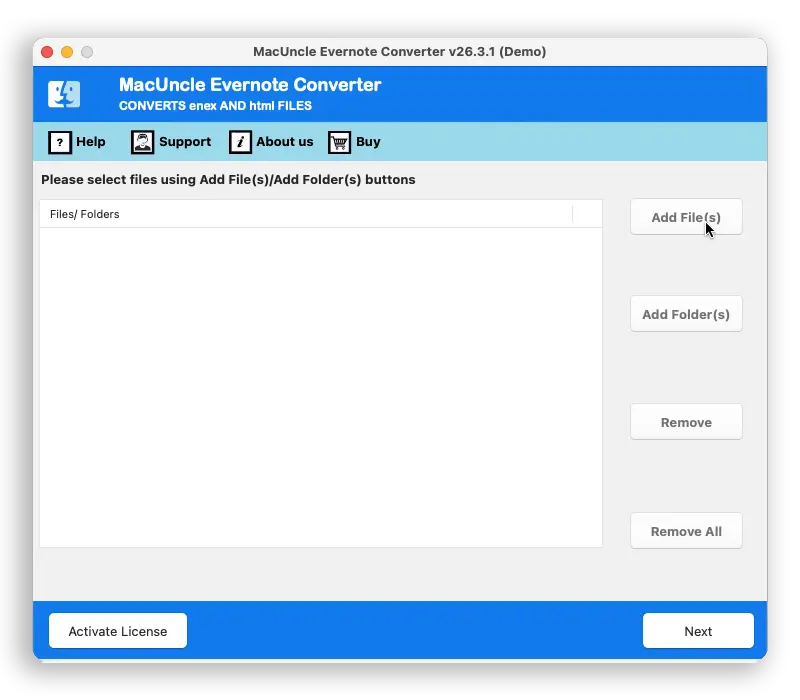
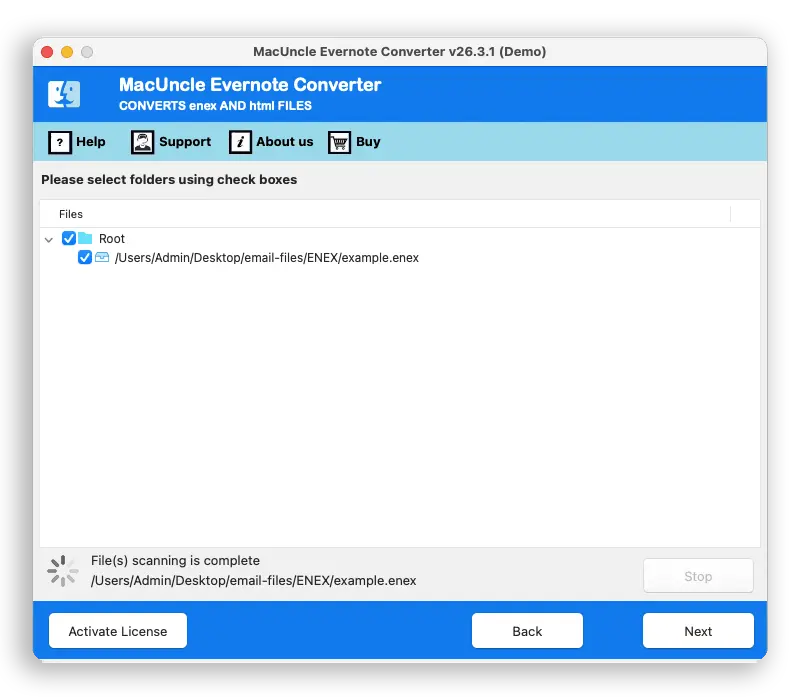
Start Evernote Converter for Mac. Add the notebook files in .enex, .html, .mht extension using either Add File(s) or Add Folder(s) button. Press the Next button. All the folders & subfolders will present on the software panel. Again, press the Next button.
Select Saving Format
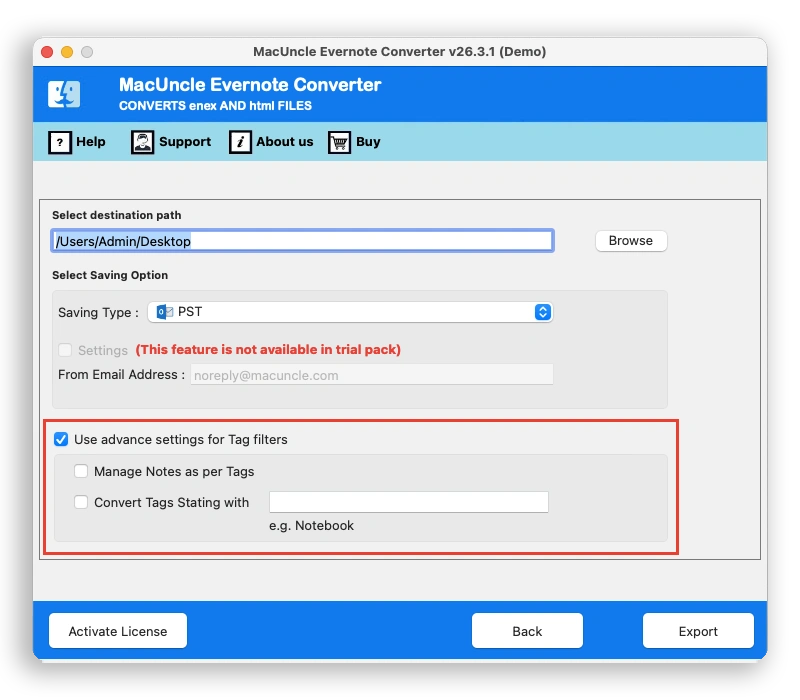
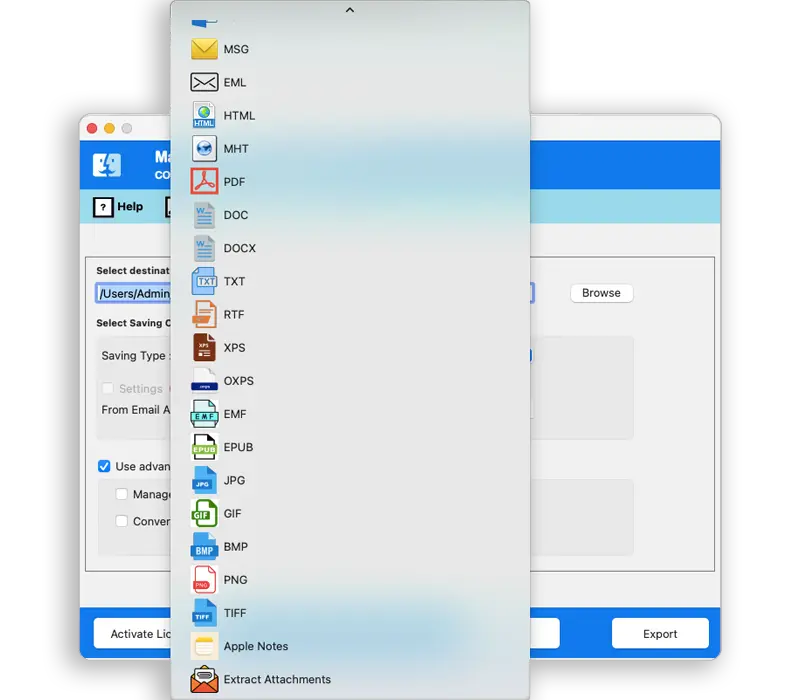
Further, a new tab with saving options and destination location will pop up. Choose any file saving format from PDF, TXT, HTML, MHT, DOC, RTF, EML, MSG, PST, XPS, EMF, EPUB, JPG, GIF, PNG, and TIFF. Browse the location to store the converted files.
Get the Resultant File
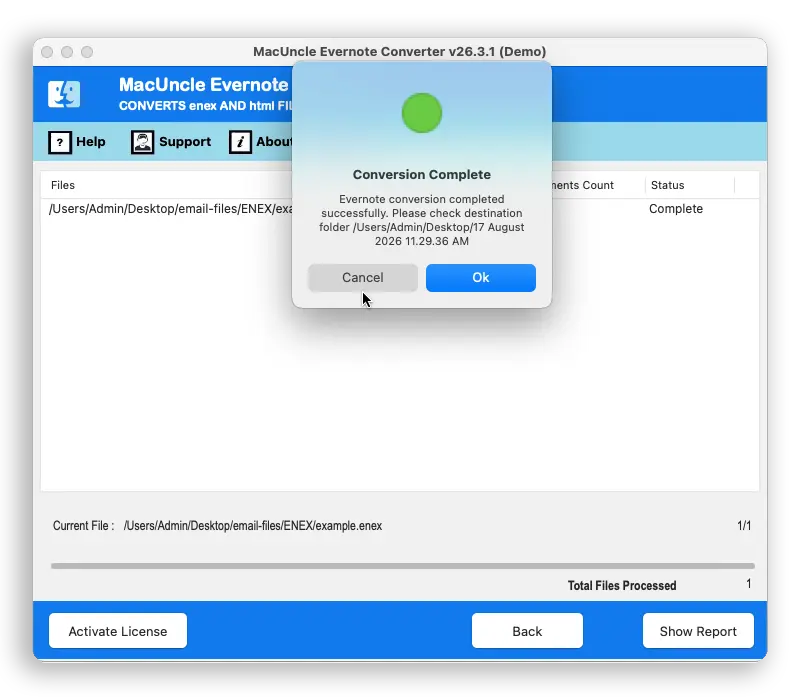
To proceed press the Export button. Soon live conversion of Evernote files will take place, within minutes a few notifications such as successful conversion completion, trial version limitation will appear on the screen. Press Ok to confirm the process.
Make your Evernote notes accessible anywhere
Accurate Result in conversion
All the text, images, audio, and attachments are carried over exactly as they are in the original file. Nothing gets lost or modified during the conversion.
One Pass, Every Notebook
Add single files or a whole folder at once and convert hundreds of notes in a single run. No need for repetition; convert multiple files at once.
15+ Saving Options
Evernote converter offers distinctive options like document, image and mail & web format. Pick a format as required for the next workflow.
Filter by Tag
With advanced features like filtering by tag, target the notes based on the set rule. Instead of sorting a large number of notebooks manually, use the filter.
Try it Before Owning It
Convert the first 5 notes to any file format using the Evernote Converter's Demo version. Check the output and upgrade for unlimited ENEX conversion.
Local File Processing
The tool runs entirely on the Mac without uploading it anywhere else. Convert ENEX and HTML files to any file format without leaving the machine.
Filter by tag
Evernote's advanced tag settings give users the privilege to sort the files based on rules, so the filing is set during the conversion, not after it.
Learn Advanced Software Traits of Evernote Converter for Mac
Complete Conversion of Evernote Data
Convert the whole Evernote data included on notebook and note. All kinds of data can be exported like text, images, audio, locally stored web contents, etc. Convert Evernote Project planner, Meal Planner, To-Do, Meeting Note, Essay Outline, etc.
Batch Conversion of Evernote Files
Upload Evernote files from the system to the Evernote Converter for Mac tool. Use Add File & Add Folder button to upload Evernote ENEX files to the software interface. With which add single or multiple ENEX files at a time, thus resulting in the batch conversion of Evernote files on Mac.
Save Evernote in Another Format
ENEX File Converter for Mac comes with multiple saving options to convert Evernote files. Save the Notebook or note files in any format with absolute accuracy and time management. The following are the categories of saving options:
Convert All Types of Evernote Notes/Notebook
Export the Evernote files to different formats from Notebook and notes. The tool does not possess any restriction while converting the files from Evernote. All file types ENEX, HTML, and MHT formats are supported by the tool. Convert Evernote files without any constraint.
Free to Store Converted ENEX Files
Before Evernote, conversion begins users are free to choose the destination location to store the converted ENEX files. Either store the files in the Desktop, default location of Evernote Converter or browse the destination location to save the files. Store the file to any location as per the user's demand.
No Limitation to Number of Files
The add button is Evernote Converter for Mac will allow batch selection of ENEX files from the system. There is no limitation on the number of file addition. Use the Pro version to Convert unlimited Evernote files without any limitation or hassle.
Get 100% Accurate Result
Convert Evernote ENEX files on Mac OS with complete accuracy. Change the file extension by maintaining the data. The files will be converted by keeping the data intact. Evernote files consist of different types of data from text to images, all the data will be preserved even after the conversion.
Mac Based Evernote Converter
Mac Evernote ENEX File Converter supports all the latest editions of OS X. The tool is a one-time investment tool compatible with all the versions such as 10.10 Yosemite, 10.11 El Capitan, 10.12 Sierra, 10.13 High Sierra, 10.14 Mojave,10.15 Catalina, 11 Big Sur, 12 Monterey, 13 Ventura, 14 Sonoma, macOS 15 Sequoia, and macOS 26 Tahoe.
Get an Overview of Evernote Converter Mac Tool Features – DEMO and Licensed Version
What’s New in the Latest Version
| Version: | v26.2.2 |
| Size: | 236.68 MB |
| Release Date: | March, 2026 |
| Software Download: | Download Now Download Now |
| Trial Limitations: | Test the Trial version of Evernote File Converter by changing file types of 5 Evernote exported files to PST, EML, DOC, PDF, JPG, PNG, etc. Check the working of the tool before purchase using the trial version. |
| Hard Disk Space: | 400 MB of free hard disk space required |
| RAM: | 512 MB of RAM (1 GB is Recommended) |
| Processor: | Apple Silicon M-series (M1 or later) |
| Platforms: | macOS 26 Tahoe, macOS 15 Sequoia, 14 Sonoma, 13 Ventura, 12 Monterey, 11 Big Sur, 10.15 Catalina, 10.14 Mojave, 10.13 High Sierra, 10.12 Sierra, 10.11 El Capitan, and 10.10 Yosemite. |
| Software Customization | Customer Support |
| Product Guide: | Software Guide Installation Uninstallation EULA |
Click any image to get acquainted with the software operations
Here are the features available in the free edition and the Full Licensed Version of the Toolkit
|
Features |
Trial Version |
Full Version |
|---|---|---|
| Convert Evernote ENEX files |
Limited (e.g., first 25 notes) |
Unlimited Notes |
| Export Notes to PDF, HTML, TXT, DOC, etc. |
|
|
| Retain the Folder Structure |
|
|
| Convert Batches of ENEX files |
|
|
| Any limitation on file size? |
|
|
| Support for Advanced Saving & Filtering |
|
|
| Option to Selectively Export Selected Notes |
|
|
| Save in User Defined Destination. |
|
|
| Technical support |
|
|
| Price |
Free |
$29 |
Frequently Asked Questions
Launch MacUncle Evernote converter on any OS X: -
After that convert the Evernote files to any format with Evernote Converter
Add Evernote files and save PDF format from Select Saving Option. Then print Evernote ENEX files effortlessly.
Yes, the Evernote Converter for Mac delivers the solution to convert bulk Evernote Files to different formats.
What Customers Are Saying
Jordan
Florida
This application saves a lot of my time. Converted around 1000 Evernote files to Document format. User friendly, simple, and quick.
Mike
USA
Evernote converter Tool for Apple computer is the best tool to convert the exported notebook & note to PDF format. I saved all my To-Do notes to Adobe PDF format for regular use. I was able to print the file with proper data organization.
Jordan
Florida
This application saves a lot of my time. Converted around 1000 Evernote files to Document format. User friendly, simple, and quick.