MacUncle
OLM to PST Tool

(Average Rating 4.2 Based on 1556 Reviews)

Experts recommended tool to convert OLM to PST format. The Tool allows you to export Mac Outlook to PST format, with advanced filters to convert only the emails you actually need.

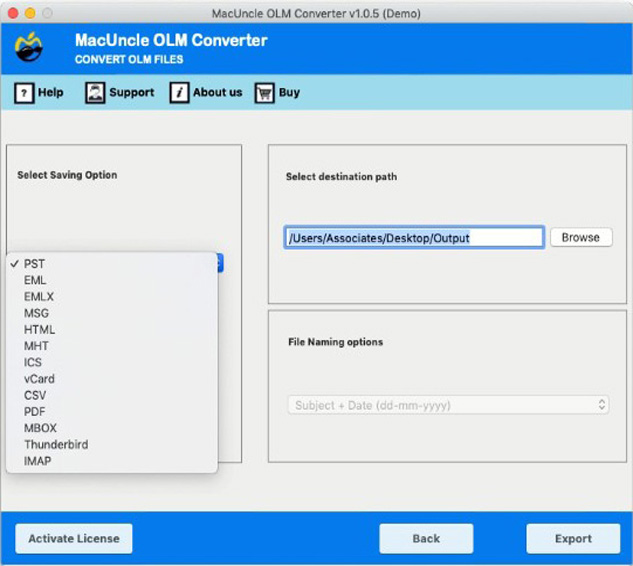
  • Convert OLM to PST and Also to Other Formats: EML, EMLX, MSG, ICS, MBOX, etc.
  • Perform Batch Conversion of Multiple OLM Files to PST in a Single Cycle
  • Select Any Folders Instead of the Entire Mailbox
  • Filter Emails by Custom Date Range before OLM to PST Conversion
  • Split Large Outlook PST Files by Size for Easy Handling
  • Preserve the Email Metadata: To, Cc, Bcc, Date & Read/Unread Status
  • Directly Migrate the OLM Data to Office 365 & Exchange Server
  • Maintains Original Folder Hierarchy After the Conversion
  • No Outlook Installation Required on Mac or Windows
  • Creates a Detailed Conversion Log Report After Each Run
  • Free Demo Version to Convert the First 25 OLM Files at No Cost
  • Get the Windows Version of OLM to PST Converter from Here
OLM to PST Converter - 3 Steps

Complete the Process to Convert OLM to PST in Three Simple Steps

Add Mac OLM Files

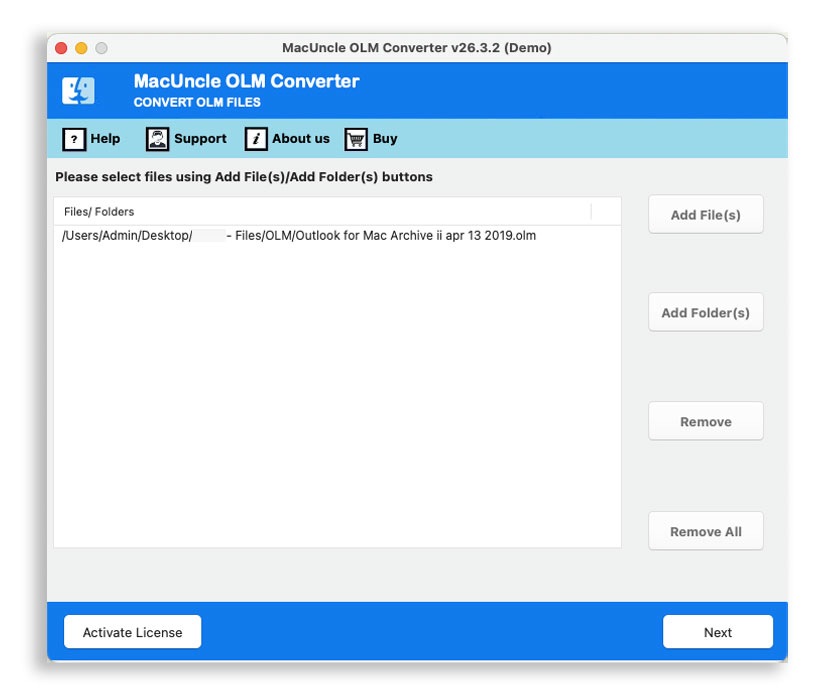
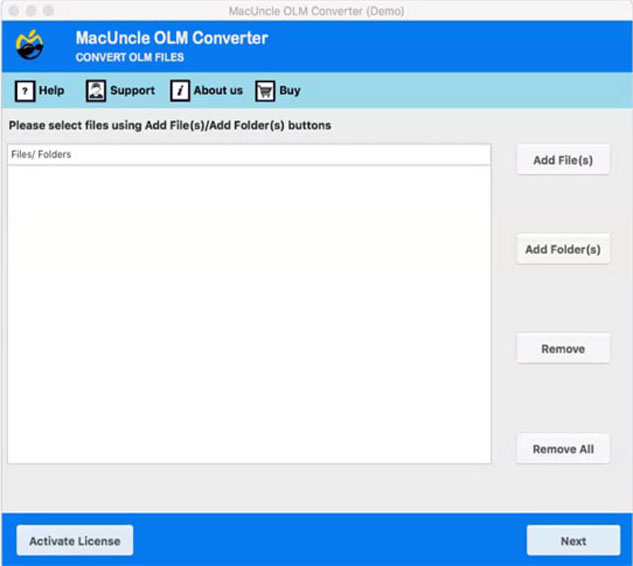
Download OLM to PST Converter Tool and install it on your Mac system. Start adding Mac Outlook OLM files to the software interface using any ADD options. Upload files or folders to the panel. Select the desired files for conversion.

Opt PST Options

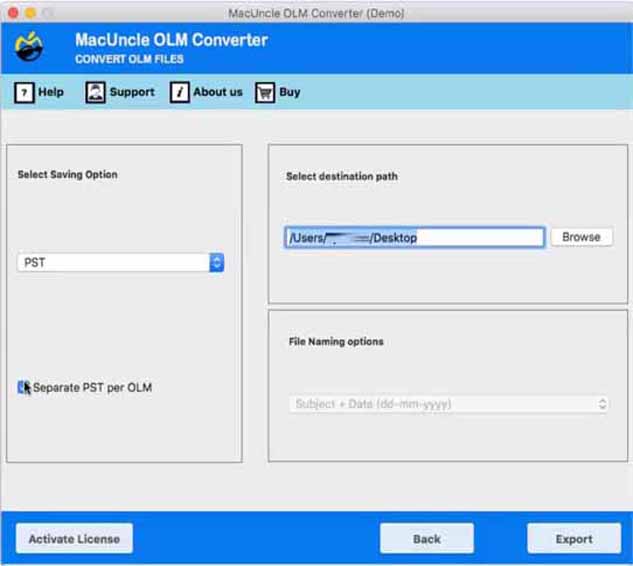
In the next step, select the PST format from the Select Saving list. Convert OLM to PST for Mac in this step. Browse an appropriate location to store the resultant *.pst file. Also, create a separate PST option enabled.

Now, Get the Result

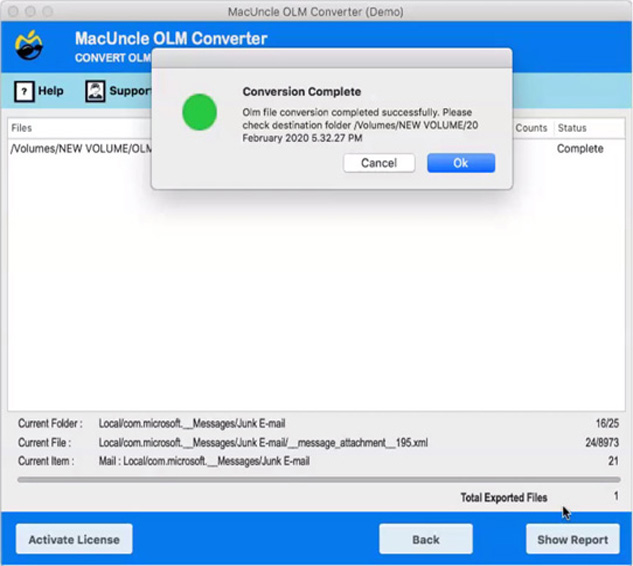
Finally press the Export button to start the conversion process. Soon the conversion starts. The final location will pop up with the resultant PST file. A log file with complete details will be provided.

convert olm to pst files

Why it Matters

Why Convert OLM Files to PST Format?

Outlook for Mac stores the emails in OLM format, which only the application can read. The moment it is out of the Mac platform or a system without Mac Outlook, OLM becomes inaccessible. Convert OLM to PST to get access in a different Outlook profile, long-term storage, etc.

Why PST files – PST files are the most preferred format that backup, archiving, and eDiscovery tools require. Having a PST copy of a Mac mailbox gives a portable, restorable backup option that isn't tied to one machine or one operating system.

Reasons to Convert OLM to PST
  • Moving from Mac to Windows Computer
  • Archive old mail before disposing of the Mac
  • Share Mailbox with Windows-only IT Team or colleague
  • Create a portable backup independent of Mac
  • Preparing PST files for migration to Exchange or Microsoft 365
olm to pst

Export Control

Control Over PST Saving Option

Before starting the conversion of OLM files, the OLM to PST tool lets the user decide how the resultant PST files should be structured and sized. The output files follow the user’s workflow.

  • Select the Outlook Format: Use the Select Saving Option dropdown to choose the resultant format.
  • Create Separate PST per OLM File: Turn on the Separate PST per OLM option to generate an individual PST for every source file, rather than merging into a single large mailbox.
  • Automated PST Splitting: Enable Split PST and pick a size limit. Divide large mailboxes into smaller, easily importable files.
  • Customise Destination Path: Browse and choose exactly where the converted files must be saved, with the full path displayed.
selective olm to pst conversion

Selective Conversion

Advanced Filter for Selective OLM to PST Conversion

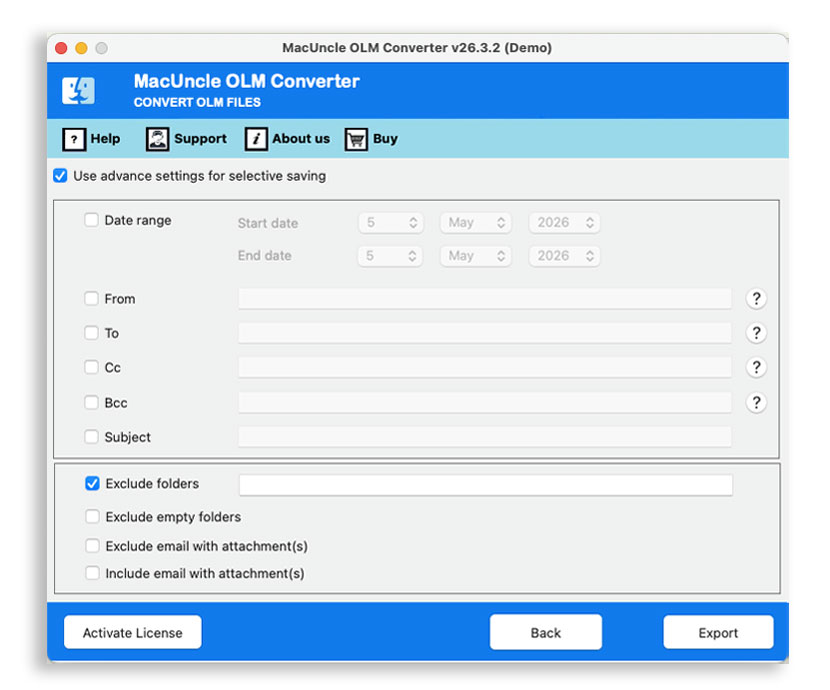
Not every export needs an entire mailbox. Switch on Use Advanced settings for selective saving to set the filters and convert only the required emails.

  • Date Range Filtering: Set a start date and end date to convert only the messages from that time period.
  • From / To Address Filter: Enter Sender and receiver address to narrow the result to emails sent from or email addresses we specify.
  • Cc & Bcc Filter: Enter Cc or Bcc email address to filter and convert the messages associated with those specific email address.
  • Subject Keyword Filter: Convert only emails whose subject line has the keyword or phrase that is specified.
  • Exclude Folder: If required, enter the specific folder name to skip during the conversion, to keep the irrelevant mailboxes out of the final PST file. It also includes an option to exclude empty folders.
  • Attachment Based Filter: Choose Exclude email with attachments for text only export of emails, and use the Include email with attachment to cluster the messages that has attachments.

Mac OLM to PST Tool - Features

Remarkable Features of the Software to Convert OLM to PST on Mac

Simple & User-friendly GUI

MacUncle products are well known for their GUI. The OLM to PST Converter for Mac offers a complete user-friendly application for the Macintosh users. The Options for conversion like uploading, removal of the unnecessary file, exporting option, etc. all are built for the ease of the user.

Dual Options to Upload OLM Files

The software offers advanced features to the user thereby providing two different options: Add File and Add Folder. It allows users to select files as well as folders containing OLM files. You can check this feature by using the free demo version.

Batch Convert OLM to PST on Mac

With the help of two different options i.e., Add File(s) and Add Folder(s) in OLM to PST tool will let the user upload single as well as multiple files for the process of conversion. The tool lets the user select files that are supposed to be converted.

Converts Emails with Attachments

The files attached to the Emails are one of the most important part. The OLM to PST tool maintains the attachments intact after conversion. No matter what the file format of the attachments is, the OLM converter will continue the conversion.

No Limitation on OLM File Size

OLM to PST converter for Mac is developed with advanced features in each part of the conversion process. It allows users to export large OLM file without any restriction. Simply download the software and install it on your Mac system.

Browse The Desired Destinations

One of the vital features is the option to choose the destination location according to the user's preference. There is a default destination location as Mac’s Desktop so that the user doesn’t have to search for their files.

Maintain Metadata and Properties

Mac OLM to PST tool is developed in such a way that it uses the output PST file just like the Mail itself. All the components like, To, Cc, Bcc, From, Subject, Date, Inline Images, read and unread status etc. are the important parts of the Emails that will not be affected by the conversion process.

Suitable for All macOS Versions

OLM to PST converter for Mac is compatible with macOS 10.10 and all the latest versions. The software supports Mac versions like 10.10 Yosemite, 10.11 El Capitan, 10.12 Sierra, 10.13 High Sierra, 10.14 Mojave, 10.15 Catalina, 11 Big Sur, 12 Monterey, 13 Ventura, 14 Sonoma, macOS 15 Sequoia, and macOS 26 Tahoe. Download OLM to PST tool for Mac and install without any limitation.

Maintain Folder Structure

Mac OLM to PST tool ensures to maintain the default and user-created folder hierarchy. It has no effect on the folder structure, name, and size. The output PST file will have the same folder as in the source OLM file. Download free demo version and check this feature on your Mac system.

Create Separate PST per OLM File

The software allows the user to select an option to create separate PST file per OLM file. This option will create individual PST for each OLM file. User can check this feature in free OLM to PST tool for Mac demo version.

System Requirements & Version Details: OLM to PST Tool

Hardware and Software Requirement to Launch the Tool

Complete Software Details

Version: v26.3.2
Size: 31.15 MB
Release Date: March, 2026
Software Download: Download Now Download Now


Trial Limitations: Get the trial version of the tool to convert OLM to PST format. All the functionality is included in the trial version with the limitations to convert 25 emails at first.


Hard Disk Space: 400 MB of free hard disk space required
RAM: 512 MB of RAM (1 GB is Recommended)
Processor: Apple Silicon M-series (M1 or later)


Platforms: macOS 26 Tahoe, macOS 15 Sequoia, 14 Sonoma, 13 Ventura, 12 Monterey, 11 Big Sur, 10.15 Catalina, 10.14 Mojave, 10.13 High Sierra, 10.12 Sierra, 10.11 El Capitan, and 10.10 Yosemite.


Product Guide: Software Guide   Installation   Uninstallation   EULA  


OLM to PST Workflow, Screen by Screen

Learn About the Process by Previewing the Images

add olm file
choose pst format
set a destination location
press export button

Free vs Full Version Comparison: OLM to PST Tool

Difference Between Demo and Full Version

Features

Trial Version

Full Version

Convert OLM to PST

25 Files

Unlimited Files

Preview Mailbox Data

No limit

No limit

Export Batches of OLM

Convert Large OLM Files

Maintain Folder Hierarchy

Preserve Email Properties

Works without Outlook Installed

OLM to PST Conversion Log Report

Dedicated Technical Support

macOS 10.10 & All Later Versions Supported

24×7 Free Technical Support (Live Chat, Email, Contact Form)

Price

Free

$29

 Download

 Buy

MacUncle OLM to PST Converter - Video Tutorial

Frequently Asked Questions

Clear Your Doubts of OLM to PST Tool for Mac

Follow Instructions to Convert OLM to PST on macOS:

  1. Step-1: Download OLM to PST Converter for Mac & Install
  2. Step-2: Choose Either Add File or Add Folder Option
  3. Step-3: Choose PST from The Selection Saving Options
  4. Step-4: Press Export to Initiate Conversion of OLM to PST

Yes, using the OLM to PST tool for Mac you can make OLM file importable into all versions of Windows Outlook.

There is no limitation on file size to convert OLM files to PST format. The conversion can be executed without any consequences.

Yes, the software maintains the folder structure as it is even after the conversion.

Yes, Mac OLM to PST converter software is compatible with Mac 10.10 Yosemite and all the latest editions.

Yes, To accomplish this, place all OLM files in a single folder and select the Add Folder option from the software's UI. After that, click the Export button to begin converting the OLM file to PST format.

The free demo version allows you to convert only 25 emails. MacUncle offers a free demo version to test the software's functionality and hardware/software compatibility without any investment. After getting satisfactory results buy the full version of the OLM to PST Converter.

The OLM to PST Converter will preview the folders from which the user can select before converting. To preview the content within the OLM files, use the OLM File Viewer freeware tool.

No. The original OLM files remain intact during the conversion. The tool creates a new PST file while leaving the original OLM files intact.

Yes, the tool has the option to split the output PST by size. Use the option to reduce the size of the Outlook PST files.

What Customers Are Saying

Verified Purchase Reviews of OLM to PST Tool