How to Delete Multiple Emails from Optus Webmail?


About the blog: A complete illustration of how to delete all emails from the Optus Webmail account. The emails can be removed completely from the account without any additional selection procedure. Like any other email client, users can delete emails from their account; however, we will also discuss the most advanced approach to instantly delete mass emails from Optus Mail.
Optus Webmail is an email service that offers email management, spam filters, draft filters, etc. Use a Web browser to access your Optus email account. Like any other mail client, it lets the user send, receive, forward, schedule meetings, etc.
Optus is winding down its Optus Net email service, and this includes the end of new @optusnet.com.au addresses. If you are still a user of an existing Optus Net account, you can access your Optus email via webmail at webmail.optusnet.com.au. Given the uncertainty of Optus Net’s email service, taking the time to back up important messages and clear out your mailbox will not only safeguard your messages but will also make the process of switching to another email provider much easier.
Why Do Users Want to Delete Email Files?
From the query above, we know that the reasons to delete or clean up emails are personal. Thus, like every email client, Optus webmail also has the option to delete emails one by one or from one page. However, the email service does not clean up the folder entirely due to various technical reasons. Therefore, we have come up with EmailRaser to delete all emails from Optus Webmail.
An occasional cleanup of an email account is a smart move if one wants to retain only important emails in the account. Checking important emails becomes stressful when the account has multiple unnecessary email files.
Important Tip: Before you start deleting any Optus email or any Optus file, it is important to first create a backup of your entire data. A backup will help you to feel free even after you delete all Optus Mail emails. You can use Mac Email Backup Software for this purpose. This all-in-one software is built to create backup of more than 200 email services.
Manual Methods to Delete Optus Mail Emails
Deleting Single Emails
- Sign in to Optus Mail.
- Click on the emails you want to delete.
- Click on the delete icon to move the email to the Trash Folder.
Deleting Multiple Emails in Optus Mail
- Use the checkbox next to each email.
- Select all the emails page by page.
- Then, click the delete button to move all the selected emails to the Trash folder.
Note: All webmails, including your Optus webmail, only ever select the messages on the current page (usually a limit of 25 – 50 messages), and so, of course, this is slow for a large mailbox and is even why a batch tool exists at all – should be made clear!
Emptying the Trash Folder
- Find the Trash or Deleted Items folders in the folder list.
- Click on the Trash folder to view the contents.
- Check for the Empty Trash or Empty Deleted Items button.
Delete Optus Emails on Mobile Device
- Access the Optus Mail account through the mobile app or browser.
- Navigate to the folder with the email you want to delete and select the emails.
- Now, look for the delete button and tap it to delete the selected emails.
- You can also empty the Trash folder to permanently delete emails.
Note: In the above section, we have discussed deletion of single emails as well as batches. From the steps, it is clear that we need to perform the removal of emails differently. Therefore, we have come up with a standalone toolkit that can be used to delete single or multiple Optus emails without repeating any steps.
Delete All Emails from Optus Webmail
Get the appropriate edition of the tool from here. Remove any email files, calendar events, contact lists, etc., from the OptusNet account. From the 30+ email client list in the tool, choose the IMAP option to delete emails from Optus Webmail. The tool works under an advanced algorithm, with which the user does not need to specifically select or repeat the whole process for multiple files. Learn how to use the application to clean up the email account.
How to Delete Optus Mail Emails in Batches?
Optus IMAP & SMTP Settings
| Setting | Value |
|---|---|
| Incoming (IMAP Host) server | mail.optusnet.com.au |
| IMAP port (secure) | 993 (SSL/TLS) |
| Outgoing (SMTP) server | mail.optusnet.com.au |
| SMTP port (secure) | 465 or 587 (SSL/TLS) |
| Username | Your full Optus email address |
| Authentication | Email ID and Password |
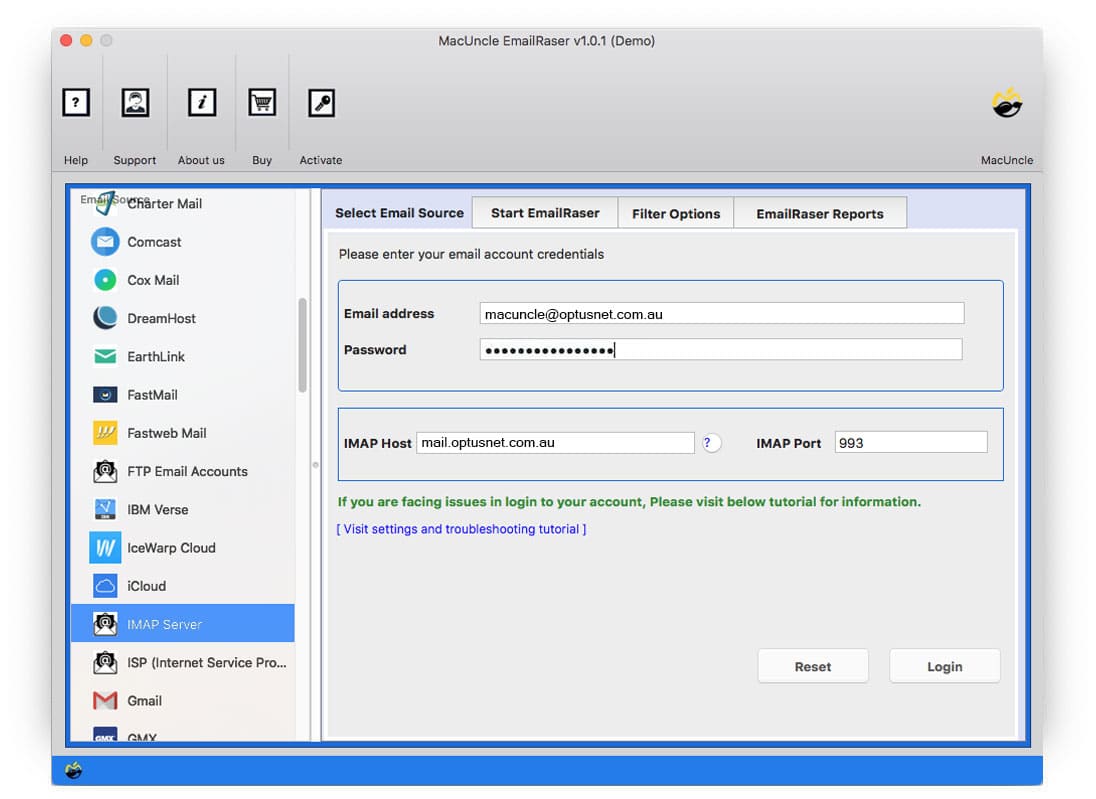
Download and launch the application right away. Select the IMAP option from the left panel.
- Enter your email address, password, and IMAP details in the required fields and press the Login button.

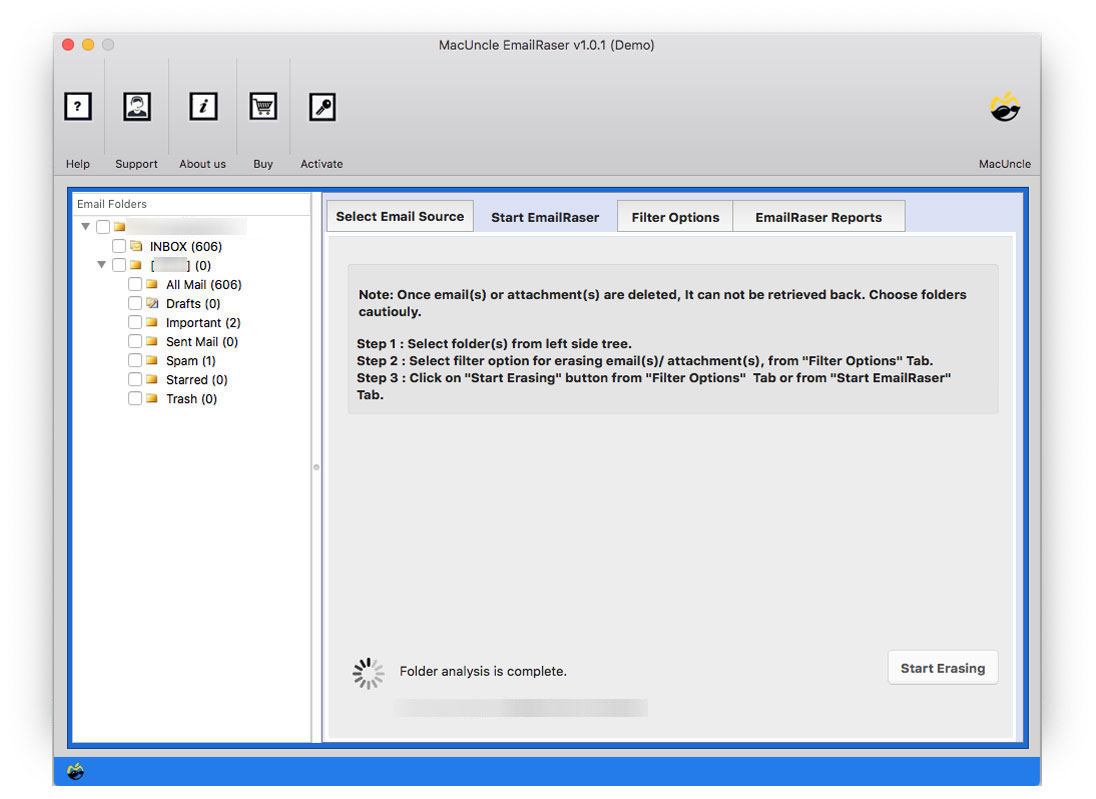
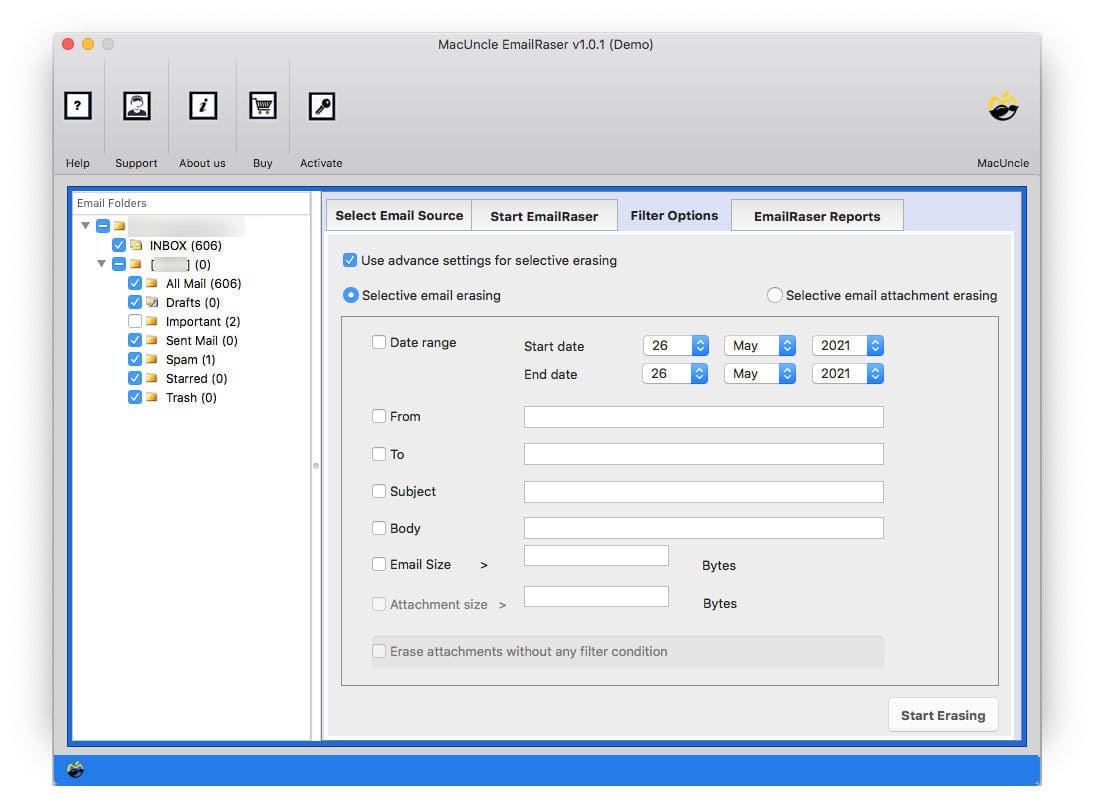
- Optus Webmail folders will display on the left panel of the tool. Now, choose the desired folder from the list and go to the Filter option.
- The Filter option lets the user delete emails from a particular date, specific sender or receiver, based on subject, etc.
- Hit the Start Erasing button to initiate the tool to start deleting email files from the account.
Learn other solutions: How to Delete Multiple Emails from Shaw Webmail?
Important Features of the Application
Why should one get a tool to delete email files? Yes, we all ask this question before narrowing it down to the software to solve any problem. Here are some of the unique traits of the application that make it stand out.
- Delete Directly from Account: The tool scans each file from Optus Mail before deletion. As soon as you click the button, the tool erases the unwanted emails from the account directly.
- Instantaneous Solution: Since the user can select an entire folder or folders, the whole process will execute within minutes. Complete email files get deleted once the tool starts working. Therefore, the user receives a message to select emails carefully.
- Attachment Delete Option: While deleting the emails, you can also erase the attachments simultaneously in the Optus Mailboxes to complete the task without repeating any steps.
- Delete Batches of Email Files: With the default option, we can only delete 200 email files and repeat the process. To overcome such a situation, use the recommended tool to delete unlimited files from Optus Mail by selecting a whole folder.
Why this matters more in 2026: With the Optus account closure policy and Optus’s record of data breaches, keeping critical mailbox data in your hands, as well as bulk deleting unwanted emails, has probably never been more important. A bulk delete program that deletes the whole mailbox at once is also probably easier than selecting each individual message on its own.
FAQs
Q) Can I retrieve Optus emails after deleting them?
A) Normally, once mail is deleted from Trash/Deleted Items, it can’t be retrieved—that’s why backing up initially is more crucial than its delete operation.
Q) What takes place if my Optus account is currently marked inactive?
A) Log in at webmail.optusnet.com.au. Optus has a minimum of 30 days of alert prior to long-term deletion when an account is marked inactive, but that window isn’t guaranteed to remain open forever.
Q) Is it still safe to keep an @optusnet.com.au address in 2026?
A) Given that Optus is actively moving users away from using the service, it’s worth viewing any kind of Optus-hosted e-mail as short-term and also moving essential emails to Gmail, Outlook, or various other service providers rather than remaining committed.
Q) Is it difficult to utilise an optusnet.com.au email address with IMAP?
A) Yes – since IMAP preserves folder sync, removing your emails using an IMAP-connected device will certainly eliminate them from the Optus Mail server, and they’ll be removed from all other tools that are linked to your account.
Conclusion
The article discusses the solution to various queries like “how to delete the trash in Optus webmail”, “how to delete spam from Optus webmail”, and “Solution to Optus mailbox full”. Go through each section of the write-up to understand how the software works and the benefits of having a third-party tool to delete all emails from Optus webmail.