Chat apps export your conversations as JSON files, which are hard to read. Chat Converter for Mac turns JSON and JSONL chat exports into PDF, HTML, DOCX, CSV, XLSX, PNG and 22 more human readable formats. Every message, timestamp and sender detail stays safe. It works with all popular chat apps.
Supports Chat Exports from All Popular Apps
Convert JSON and JSONL chats exported from these platforms
A Quick Look at Every Core Capability of the JSON Chat Converter
The Software to Convert Chat Files Completes the Process within a Few Clicks
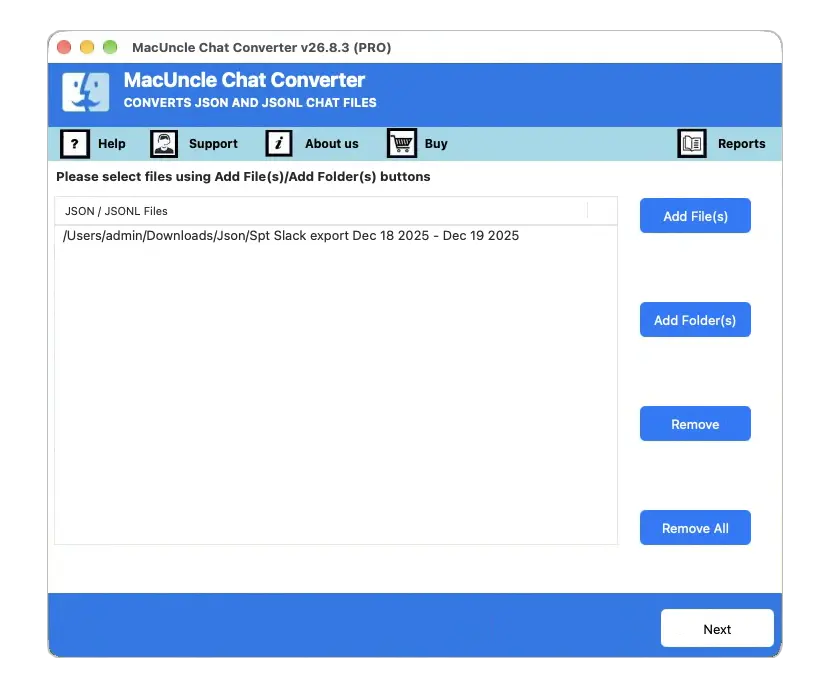
Launch Chat File Converter
First, download Chat Converter and install the setup on your Mac OS computer. Use the Select Files or Select Folder option to upload the JSON chat conversations to the program.
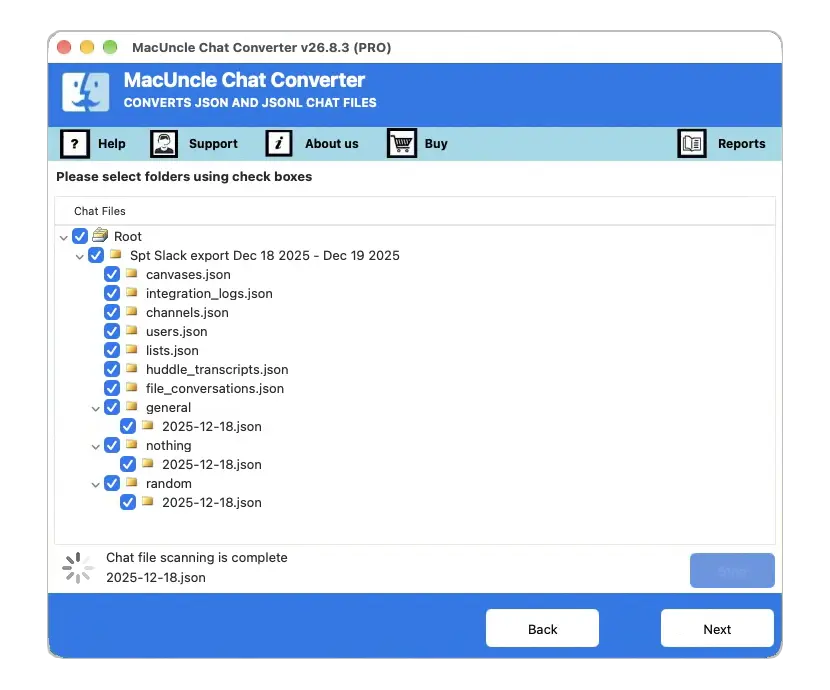
Select Export Option
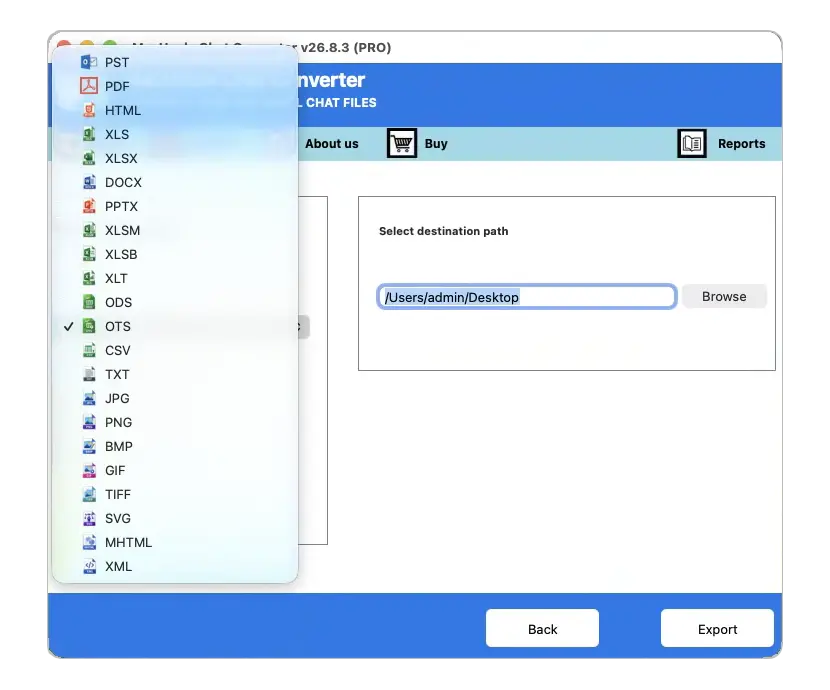
From the Select Saving Option list, choose the desired file format, such as PDF, CSV, XLSX, HTML or PNG. Browse a location to store the converted chat files on Mac OS.
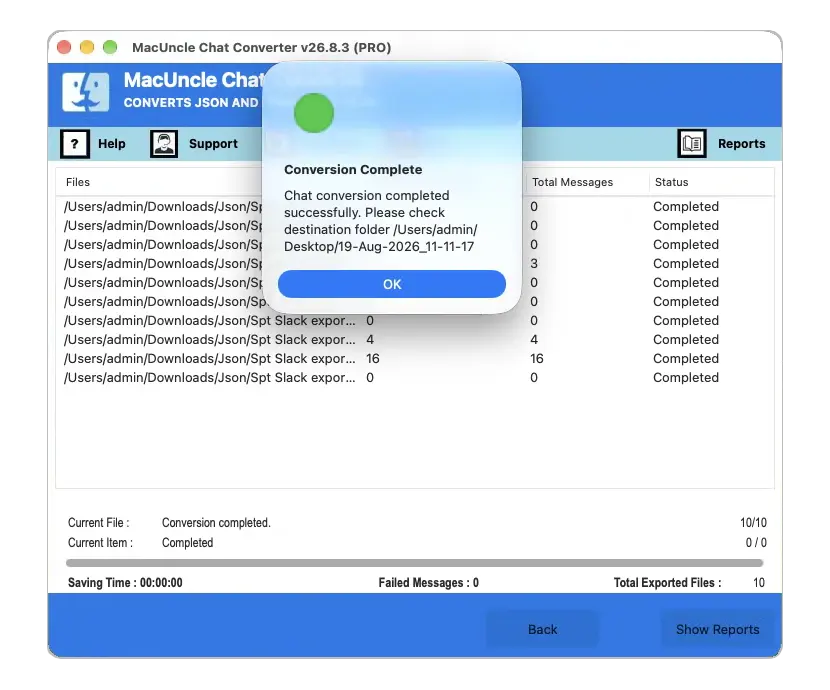
Get the Accurate Result
To begin the chat conversion procedure, press the Convert button. When the process finishes, press the Ok button. The folder containing the converted chats will open automatically.

Powerful Chat Export Features to Convert JSON Chats with Ease
Users of any chat application can use this Chat File Converter to easily export complete conversations from JSON and JSONL files to 21 other file formats. The export options cover 11 document, 9 spreadsheet and 8 image formats. The software keeps full data integrity during conversion and can be used an unlimited number of times for all saving options.
Why Choose MacUncle JSON Chat Converter?
The tool fits individual users, IT professionals and organizations that need chats in a readable format.
Legal and Forensic Professionals
Investigators, lawyers and advocates often need to submit chat conversations as digital evidence. Courts commonly accept evidence in PDF format. This tool converts chat JSON files into clean, court ready PDF documents with page setup options, so the records stay organized for legal use.
Active Social Media Users
Users who chat daily on Instagram, Facebook, Signal or Telegram should keep a readable backup of their conversations. The Chat Converter supports every source that exports chats in JSON format, so you can archive, access and manage social media conversations with ease.
Web Developers
Developers often display chat conversations on websites for documentation, demos or reports. The tool converts chat databases into widely supported image formats like PNG, JPG, SVG and BMP. The resulting chat images can be embedded into web pages for a clear presentation.
Data Analysts
Analysts prefer chat discussions in table form for clear review and reporting. The Chat Converter exports conversations into multiple table formats, including XLSX, CSV, ODS and OTS. The chat data stays organized, accessible and easy to work with in any spreadsheet app.
Some Features of the Tool to Convert Chat Files
Add JSON or JSONL Chat Files
Chat Converter for Mac OS exports chat conversations to commonly used, human readable file formats. It reads chat files saved in both JSON and JSONL structure. Chats exported from any supported application can be added to the software interface without causing any alteration.
Export Chats to 22 File Formats
One tool covers all 22 saving options. Document and data formats cover PST, PDF, HTML, DOCX, PPTX, MHTML, and XML. Spreadsheet formats include XLS, XLSX, XLSM, XLSB, XLT, ODS, OTS, CSV, and TXT. Image options add JPG, PNG, BMP, GIF, TIFF, and SVG.
Supports Batch Chat Conversion
Chat Converter for Mac OS has got two upload options to add the chat files or folders to the software panel for conversion purposes. The options are Select Files and Select Folder, which allow you to choose single JSON files or folders containing unlimited chat conversations. Both options offer batch conversion of chat files.
Preserves Complete Chat Details
The software keeps all conversation details during the chat conversion. Timestamps, sender names, email addresses and full message content are the most important parts of a chat record. The application has been developed in such a way that every detail remains the same even after conversion.
Separate File for Every Chat
The application automatically generates a separate output file for each chat conversation. For example, if your chat database contains 10 conversations, the software will create 10 individual result files. This structure keeps the converted data easy to manage, search and access at any time.
Choose the Desired Location
The JSON Chat Converter stores the resultant files on the desktop by default. You can also pick a different destination folder by clicking the browse icon. Even an external storage device can be connected to store the resultant chat files.
Compatible with All macOS Versions
The Chat Converter tool can be installed on all Mac OS versions. It runs smoothly on the latest macOS 26 Tahoe and Sequoia as well as older editions down to 10.10 Yosemite. The clearly labeled tabs and buttons allow even non technical users to convert chats confidently.
Offline and Secure Conversion
The software works offline without any internet connection, so private conversations never leave your computer. It is completely free from malware, viruses and ransomware. Developed by an in house team, the tool focuses on protecting user data and maintaining privacy at every step.
Software Specification
Latest Release Details
| Version: | v26.8.3 |
| Size: | 174 MB |
| Release Date: | August, 2026 |
| Software Download: | Download Now Download Now |
| Trial Limitations: | The trial version of the Chat Converter converts the first 25 chats from JSON and JSONL files. With this version, you can understand the working of the software and all its important features. |
| Hard Disk Space: | 200 MB of free hard disk space required |
| RAM: | Minimum 4 GB of RAM (8 GB is Recommended) |
| Processor: | Intel or Apple Silicon (M series) processor |
| Platforms: | macOS 26 Tahoe, macOS 15 Sequoia, 14 Sonoma, 13 Ventura, 12 Monterey, 11 Big Sur, 10.15 Catalina, 10.14 Mojave, 10.13 High Sierra, 10.12 Sierra, 10.11 El Capitan and 10.10 Yosemite. |
| Product Guide: | Software Guide Installation Uninstallation EULA |
Follow the four steps to see how the chat conversion works
Find out what is included in the trial and full version of Chat Converter
|
Features |
Trial Version |
Full Version |
|---|---|---|
| Convert JSON and JSONL Chat Files |
First 25 Chats |
Unlimited |
| Batch Convert Multiple Chat Files |
|
|
| Selective Chat Conversion |
|
|
| 22 Saving Options for Documents, Tables & Images |
|
|
| Preserve Timestamps, Names & Message Text |
|
|
| Separate Output File for Every Conversation |
|
|
| Compatible with All Latest Mac OS Versions |
|
|
| 24*7 Free Technical Support |
|
|
| Priority Technical Support |
|
|
| Price |
Free |
$29 |
Learn the Step by Step Procedure to Convert Chat Files Using This Tool
What the Video Shows
Watch the full conversion once and you can repeat it in under a minute.
Frequently Asked Questions
Follow the Instructions to Use the JSON Chat Converter Tool:
The software supports JSON chat files exported from multiple sources, including Slack, Signal, Matrix, Google Chat, Skype, Microsoft Teams, Instagram, Telegram, Airtable, Mattermost, Facebook and Rocket.Chat.
Yes, the application is well suited to batch convert chat conversations without size or quantity limitations. Use the Select Folder option to add unlimited chats in one go.
Yes, the software reads both JSON and JSONL chat structures. Both file types can be added together and converted to any saving options.
Yes, choose PDF from the saving options list. The tool offers page setup options and keeps timestamps, sender names and message text intact, so the output stays organized for legal documentation.
Yes, the Chat Converter comes with both trial and full versions. Using the trial edition, one can convert the first 25 chats from JSON and JSONL files to another format.
Yes, the Mac Chat Converter is compatible with macOS 10.10 Yosemite and all the latest versions of macOS, including macOS 26 Tahoe and macOS 15 Sequoia.
Yes, Telegram Desktop saves exported chat history as a result.json file. Add that file using the Select Files option and convert it to PDF or any other readable format.
No, WhatsApp exports chats as TXT files, not JSON. This tool only reads JSON and JSONL chat files, so WhatsApp exports are not supported.
No, the Chat Converter for Mac OS works independently and fully offline. It needs no external application or internet connection, so your private conversations never leave your computer.
What Customers Are Saying
Marcus Reed
IT Administrator, Washington
I exported my Slack workspace history in JSON format and could not read a single conversation. MacUncle Chat Converter turned the whole folder into clean PDF files in one run. Every timestamp and sender name stayed in place. The tool paid for itself on the first day.
Elena Fischer
Corporate Legal Assistant, Germany
As a legal assistant, I needed Telegram and Facebook chats in a printable format for a case file. This Chat Converter created a separate PDF for every conversation with page settings I could control. The selective conversion option saved me hours of sorting work.
Rajiv Menon
Data Analyst, California
Our team needed Google Chat exports in spreadsheet form for analysis. The tool converted thousands of JSON conversations to XLSX without a single error. The batch mode and the offline working are the two features that made me choose it over online converters.
Ready to Convert Your Chat Files?
Download the free trial and convert your first 25 chats today. No signup needed.
100% Safe and Secure
30 Days Money Back