Video

Guide

MacUncle HTML Converter

Reliable way to batch converts HTML files on Mac. Export offline web pages, raw HTML source code and HTML emails to 8+ formats with zero data loss.

  • Process Multiple *.html or *.htm Files in Batches Simultaneously
  • Convert HTML Files on Mac to PDF, MBOX, EML, MSG, etc.
  • Retain all Formatting - Tables, Inline Images, Hyperlinks, CSS Styles, etc.
  • Convert HTML Archive of Any Size or Quantity without any Restrictions
  • No Additional App or Plugin Required to Complete the Process
  • Download the Appropriate Version of HTML Converter
  • Convert HTML Files on Mac with Complete Accuracy

Convert HTML File in 3 Steps - How it Works

MacUncle HTML Converter takes just a few clicks – no technical knowledge required.

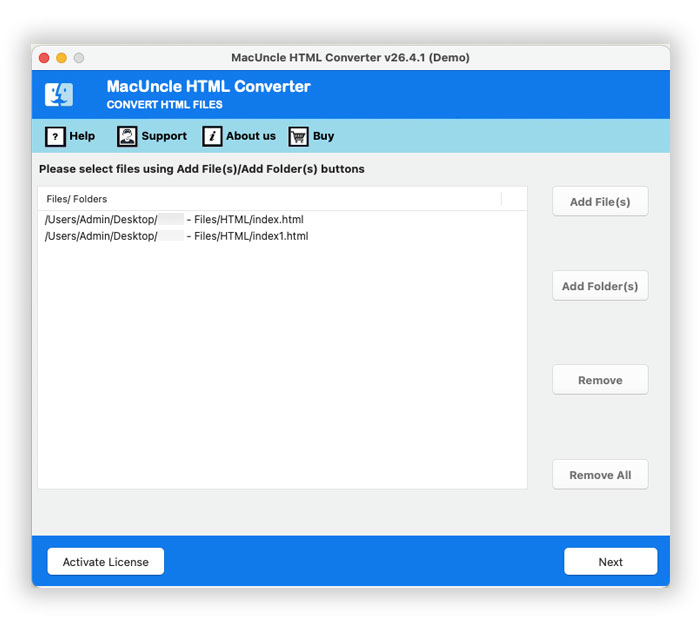
Load HTML Files

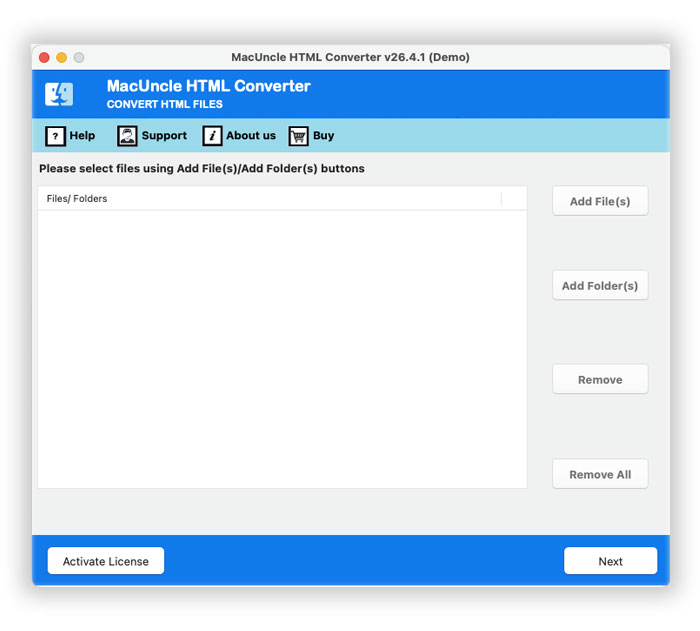
Download and Install HTML Converter on Mac. Start the software and use the Add buttons – Add File to select individual files or Add Folder to load directories of HTML Files.

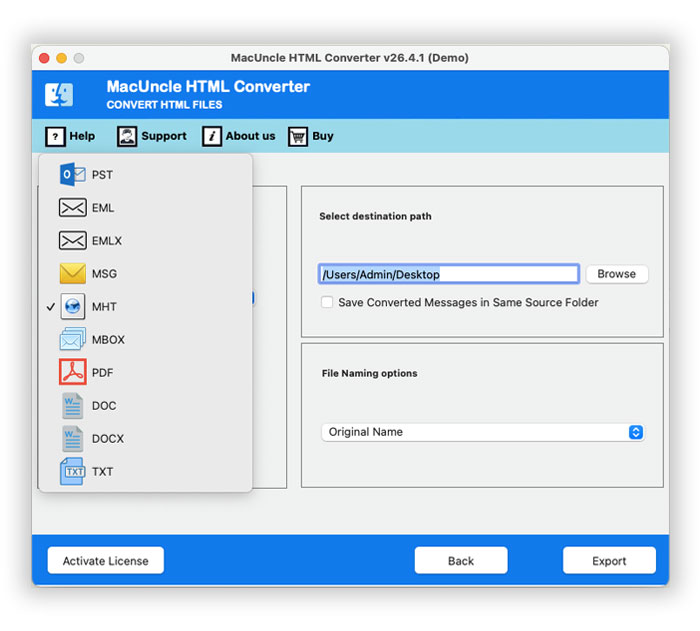
Choose the Outlook Format

Now, select the desired format from the options as per the requirement. Then, apply other advanced settings such as file naming options and destination folder settings.

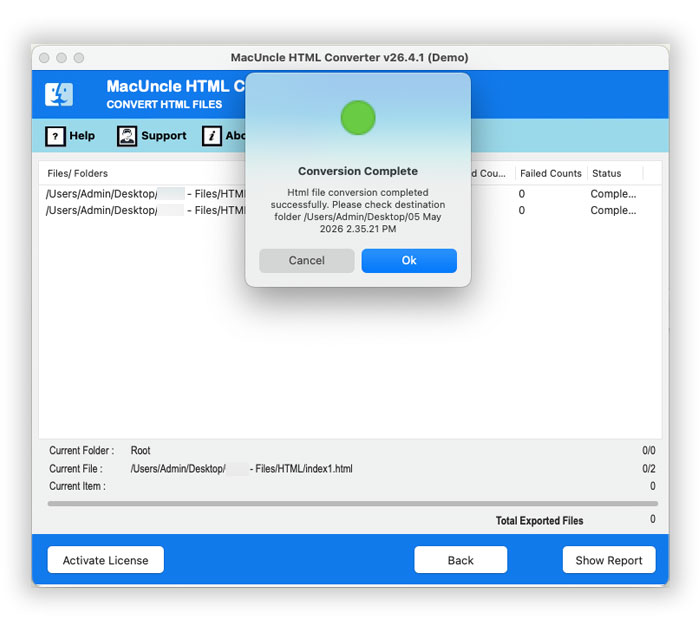
Convert HTML File

Click the Convert button to start the HTML file conversion. Instantly, the software will display the live progress. A trial version message and the conversion log report will open right after.

HTML Converter – Export to 8+ Standard Formats

MacUncle HTML Converter supports all the major email and document formats. Choose any output format based on the specific workflow. Here are the options from client migration to document archiving.

PST

By choosing this option, export HTML webpages as PST files, which is an ideal format for Microsoft Migration. It works well in the Windows workflow.

PDF

Creating PDF documents of HTML files is a great way to share the content. It is best suited for printing with retained layout and archiving documents.

MBOX

Convert and Save HTML in MBOX, which is compatible with Apple Mail, Thunderbird, Opera Mail, Gmail Exports, etc. One of the most popular formats for message storage.

EML

Export HTML webpage or email files to individual EML messages compatible with email clients like Microsoft Outlook, Apple Mail and Thunderbird.

EMLX

Apple Mail users can specifically convert the file to EMLX format to import the messages in HTML. As the file format keeps all specific metadata.

MSG

Saving *.html or *htm file to a MSG file allows you to open, read, and manage the files with Microsoft Outlook and preserves better formatting & structure.

DOC

Convert HTML webpage or emails to DOC format. It is useful for content teams, editors, and for document purposes, allowing easy editing.

MHT

Converting web pages or HTML emails to MHT as a single file allows easy access, support offline use, and enables sharing it as a complete webpage.

Essential Features of Mac HTML Converter

Check out the features of the tool built for professional-grade HTML file conversion.

Batch HTML Conversion

Process any number of HTML files simultaneously with the dual file adding options. Select individual files with Add files and the entire directory with HTML files using Add Folder. With this, you save significant time compared to converting the files one by one, making it ideal for large email archives.

Error-Free Formatting Retention

The advanced rendering algorithm ensures there is zero data loss during the conversion of HTML files. The tool ensures to accurately preserve all HTML and CSS elements that are inline images, complex tables, hyperlinks, text formatting, and embedded media – so the output file will look exactly like the source HTML files.

Offers Complete Data Security

Unlike any other online HTML converter, the tool does not take the files outside the server to process. The confidential emails, legal documents, private webpages, etc., will remain completely secure in the local machine at all times. MacUncle HTML Converter works offline on the Mac, as they are locally processed and not sent to an external server.

Maintain Original Folder Hierarchy

Most HTML files are organised across multiple directories, and then HTML Converter processes the file and automatically recreates the same folder structure in the output folder too. This allows the user to navigate easily and locate the file after the conversion. And ensure the converted data stays perfectly organised, eliminating the effort to manually restructure the folder.

File Naming Conventions

Use the file-naming pattern option to keep the converted HTML files perfectly organised with different types of options. The combination of the options is like Subject, Date, Subject + Date, From + Subject + Date, Auto-Increment, and more. The feature is especially useful when converting large batches of HTML emails to individual EML, PDF, etc.

No HTML File Size or Quantity Restriction

The tool is built for professional-grade use. MacUncle HTML Converter possesses no restriction on the size or the number of HTML files that can be processed. Whether there are a handful of small webpages or a massive archive of HTML files, the software handles everything equally and efficiently without causing any performance crashes.

Customize Destination Path

Use the “Select Designation Path” option to save the converted HTML file to any location. The software used the default location, the Desktop, for easy access after converting the files. Browse and set any location on the hard drive or external storage device before starting the conversion. Anyway, the final folder will open up right after the conversion is completed..

Built Natively for Mac

Designed specifically for Mac ecosystem, the converter provides a smooth experience across all macOS version from 10.10 Yosemite through macOS Taho. No additional plugins or configuration required at any point of the conversion – simple install and start converting the HTML files instantly.

Mac HTML Converter - System Requirement

Make Sure to Have Required Hardware and Software to Run This HTML Converter

Software Name: Mac HTML Converter v26.2.1
Processor: Minimum 2.4 GHz Processor
RAM: Minimum 1 GB
Minimum Hard Drive Space: 400 MB of free space
Operating System: macOS 10.10 Yosemite or later up to macOS 15 Sequoia.

Software Specifications

  • Supported OS: macOS 26 Tahoe, macOS 15 Sequoia, 14 Sonoma, 13 Ventura, 12 Monterey, 11 Big Sur, 10.15 Catalina, 10.14 Mojave, 10.13 High Sierra, 10.12 Sierra, 10.11 El Capitan, and 10.10 Yosemite.
  • Processor: 1 GHz Processor (2.4 GHz is recommended).
  • RAM: 1 GB Recommended.
  • Hard Disk Space: 400 MB of Free Hard Disk Space Required.

Download

Size: 73.44 MB, Version: 4.5

Product Guides

Software Guide Installation Uninstallation EULA

Demo Version Limitation

The free trial version of HTML Converter allows you to convert 25 files in the first session. Understand how the conversion works with all the important features in it.

Software Delivery

The HTML File Converter’s Pro version is delivered via email. After confirming the payment, you will receive an email with the link to download the product with the activation key.

Software Customization Request

If you want any modification to the software or even require more functionality, Get A Quote.

What Customers Are Saying

Check Mac HTML Converter Full Version Users Reviews
FAQs

Everything you need to know about converting HTML files on Mac.

Download and install MacUncle HTML File Converter:

  • Launch the software on the system.
  • Click Add File to select HTML file(s).
  • From the saving format list, select PDF.
  • Choose the destination folder and file naming convention.
  • Click the Convert button to start.

The software will convert the HTML files to a desired format and open the output folder automatically upon completion.

Yes, you can convert multiple HTML files at one time, bulk or batch-wise, especially if you have software designed for converting batch HTML files. By clicking on the Add Files button, you can choose multiple HTML or HTM files from different locations individually, or you can pick the Add folder option if you want to open the whole directory. However, you can convert as many files as you want with the Pro version.

No, there are no limitations. You can use the tool to convert HTML files of any size or number. The software is capable of processing large collections of HTML files with heavy elements without any performance degradation.

The software offers the ability to export to the following formats: PST, MBOX, EML, PDF, MSG, DOC, and MHT.

Yes. In order to get precise results, MacUncle HTML Converter employs an advanced rendering process that keeps the data loss at zero. The converter preserves "inline" images, complex tables, background colours, hyperlinks, CSS styles and more. Output files are visually identical to the original HTML source.

By using the MBOX format as the saving option, one can easily export the emails, and the resultant file can be imported into the Apple Mail account. The email features like To, From, Subject, Date, CC, BCC, and attachments are preserved during this process.