How to Convert MBOX to EML Format ?


MBOx files are used to store multiple emails in a single mailbox format. It is supported by various email client including Thunderbird, Apple Mail, Entourage, Opera Mail, etc. Even though it is one of the most commonly supported file formats, there are instances when we want to convert MBOX to EML or other file formats. Here we will focus on the EML file format.
Let’s find out first what MBOX and EML files are, and the core reasons why users want to convert the MBOX files to EML, various methods and common challenges. We will also explain which tools are best suited for different scenarios, along with their key advantages.
What are MBOX & EML Files?
MBOX files, as we said before,e are mailbox files that stores multuiple email messages in a single file. Each message with email body, attachments, sender information and other data are cancatinated in a single file. It is separated from. We can’t directly open the MBOX files without the native email client, such as Thunderbird, Apple Mail, etc.
Popular email clients that support MBOX are Mozilla Thunderbird, Apple Mail, Eudora, Entourage, SeaMonkey, Opera Mail, etc.
EML files are single-message email files, unlike MBOx files. It stores one email per file, including body content, header, attachments, and metadata. It is supported by email clients like Microsoft Outlook, Thunderbird, Windows Mail, etc. We can open EML files with text editors, but the content will be displayed in raw format, which is not easy to read.
The MBOX files are efficient in storing large emails, but it lacks the compatibility and flexibility. Therefore, most users prefer to convert MBOX to EML format.
Why Convert MBOX Files to EML Format?
Now, we will discuss the reasons why users or organisations want to convert MBOX to EML format.
- Better Email Client Compatibility: Many email clients like Outlook, Thunderbird, Windows Mail, and modern email platform supports EML files easily.
- Improve Email Management: since emails are stored as separate files, it is easier to store, categorise and get the messages from the EML files.
- Improve Backup and storage: Most users convert MBOX to EML to create most manageable backup, as if any one EML file is corrupted or damaged, the rest of them are safe.
- Better for sharing and archiving: The individual EML files are better for sharing emails and for archiving.
- Simplifies the Data Migration: When we are switching email platforms, EML files are often the easiest ones to import and make it easy to perform the migration.
How to Convert MBOX to EML Format?
First lets start with the Manual approaches and see if it works, else move to the more advanced methods with an instant solution. Lets are with method 1.
Method 1: Using Apple Mail
If you are using macOS, then the simple approach we can use here is the Apple Mail email application.
- Start Apple Mail.
- Go to File > Import Mailboxes… from the drop-down menu.

- Choose a file in MBOX format and click continue.

- Now, browse to locate the MBOX file to import and click on Choose.
- Save the emails as EML format using File > Save As
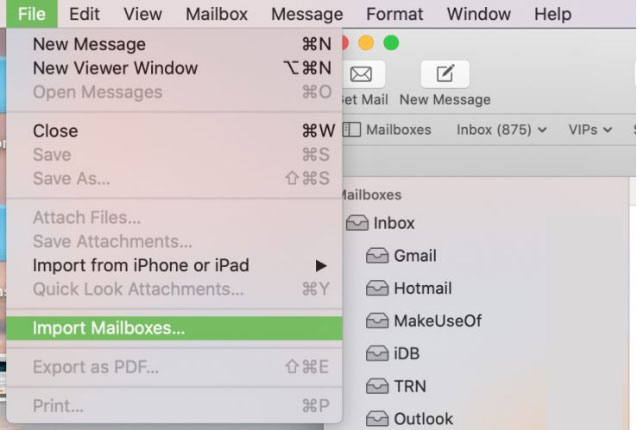
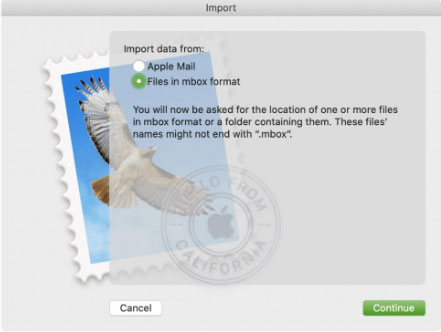
Limitation: the method is for macOS users, and it is not suitable for large MBOX files, as it could slow, freeze or even crash during the import process.
Method 2: With Mozilla Thunderbird
For Windows Users, Thunderbird is an alterative for the Apple Mail method. Follow the steps to convert MBOX to EML using Thunderbird.
- Install Thunderbird.
- Get the ImportExportTools NG add-on.
- Now, import MBOX using the add-on.
- Select the emails you want to export.
- Right-click and choose Export as EML.
- Choose the destination location
Limitation: It is also not ideal for large MBOX files. Exporting to EML files one by one is time-consuming, and there is also there are chances of missing emails or attachments.
Method 3: Drag and Drop Method
Some email clients do allow dragging the emails from the local folder in EML format. It is suitable for a few emails. As performing dragand drop method for each of the MBOX files is daunting and time-consuming.
Professional Way – Use MBOX to EML Converter
For bulk converting MBOX to EML using a professional tool with the option to export multiple EML files is the best. We can use MBOX File Converter, a tool that can process multiple mailboxes at once and give a resultant file in EML format while keeping the originality 100%. All the email data and formatting will be preserved while processing and converting to the EML format.
How to Convert MBOX to EML in Batches?
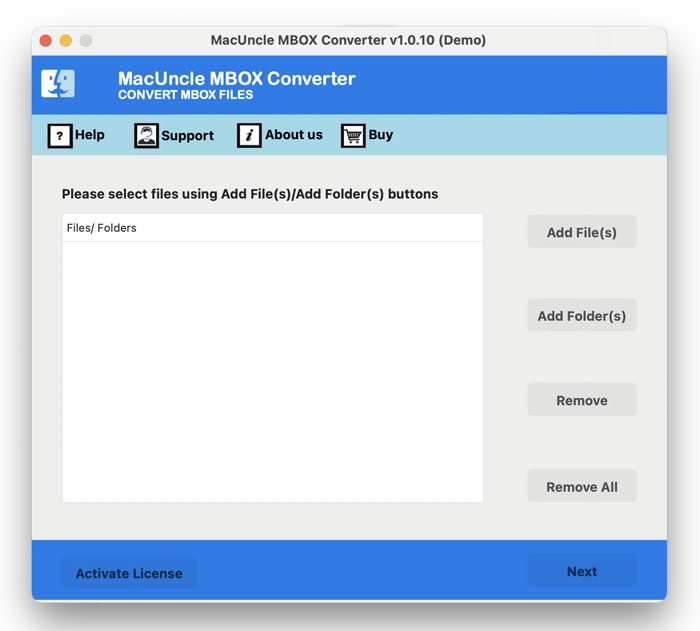
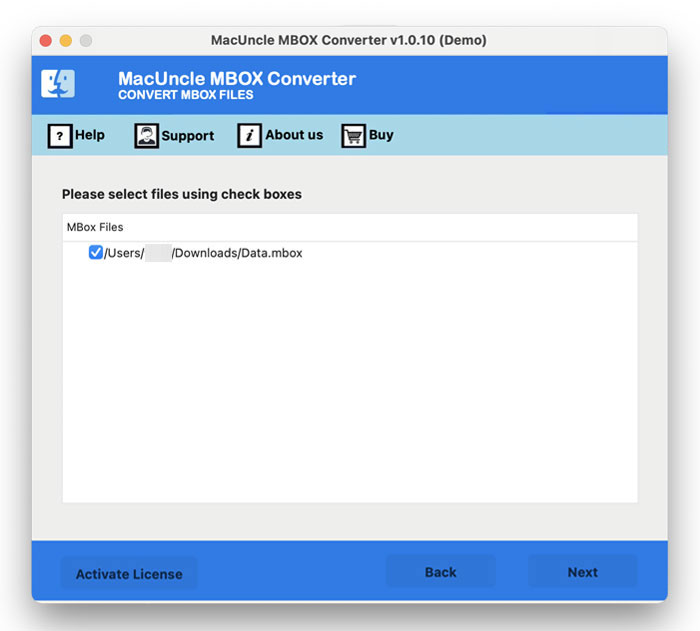
- Start the tool on the system.

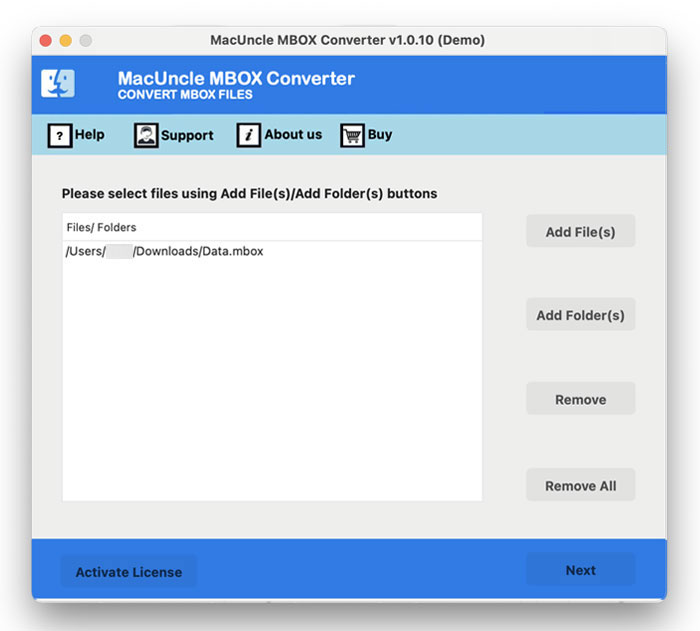
- Add the MBOX file and press the Next button.
- Select any file from the list. Again, Press Next button.
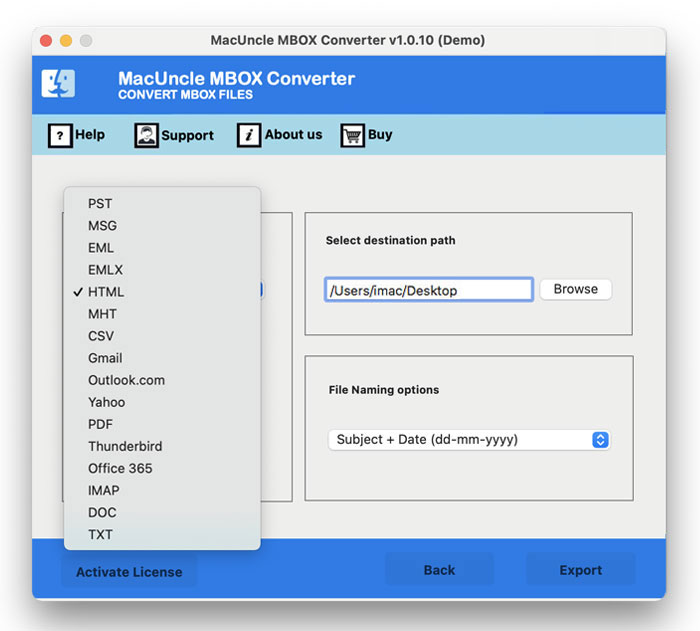
- Now, choose EML from the list of saving formats.
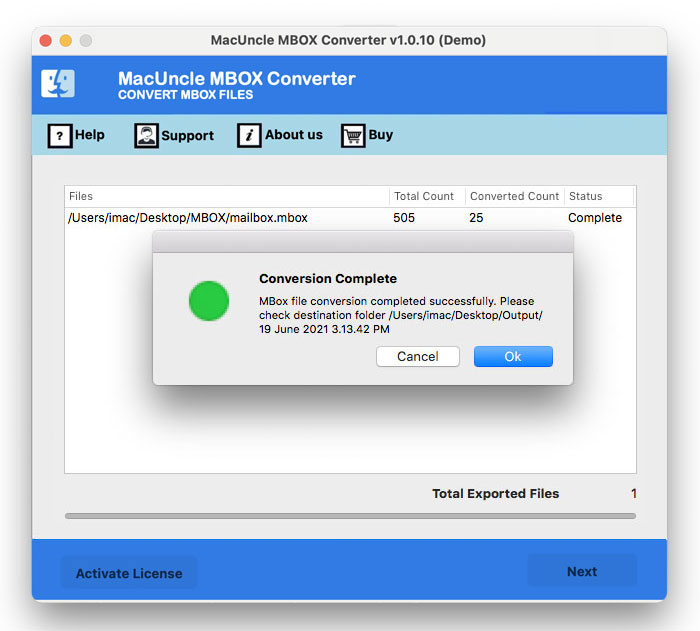
- Finally, press the Export button to start the conversion.
FAQs
Q) How to convert MBOX to EML format for free?
A) If you want to convert a MBOX file to EML format for free, using an email client like Apple Mail or Thunderbird is the best option. If you have large MBOX files, use the recommended professional tool.
Q) Can I convert multiple MBOX files at once?
A) Yes, if you use the tool mentioned in the article.
Q) Does the email formatting change when I convert MBOX to EML?
A) If you are using the software mentioned here to change MBOX to EML format.
Conclusion
For better email management and compatibility, it is a smart choice to convert MBOX to EML format. While we can use Thunderbird or Apple Mail, as both support EML and MBOX files, to export the mailboxes to EML format. However, the method could be inefficient for large MBOX files and is prone to errors, like missing emails or attachments. Therefore, we have the MBOX to EML Converter tool, that ensure fast conversion by processing the files properly with data integrity and preserves the formatting.