Does Hotmail Account Still Exist? Here’s the Complete Details


The various changes to Hotmail ended up confusing the users. One of the most common questions over the years was “Is Hotmail still around?” Here, we will know the entire transition timeline and the way to get the emails both online and offline.
Hotmail had a very exciting history as one of the first pioneering webmail sites on the internet. As it was launched in 1996, its popularity grew gradually thanks to its innovative approach to email, as well as being a free service. Hotmail was one of the revolutionary email clients, changing the mode of our communication online. It was among the very first webmail providers allowing users to check their emails for free. With time, technology has progressed, and more email providers have emerged. We will thus find out if Hotmail is still around.
Does Hotmail Still Exist?
Quick Answer: Yes, Hotmail still exists. Microsoft rebranded it as Outlook.com in 2013. The @hotmail.com address still works, just log in at outlook.com with your existing email and password. However, you cannot create a new @hotmail.com address, but all existing accounts remain fully active.
What Happened to Hotmail Accounts Over the Years?
As we talked about earlier, Hotmail is no longer a standalone service. While it hasn’t totally disappeared, users can still access their old email addresses. Microsoft has shifted the service to Outlook.com. Here is the timeline of the changes:
- Original Hotmail: The very first version of Microsoft’s free web-based email service, rolled out in 1996.
- MSN Hotmail: Microsoft Network Hotmail, a later version of Hotmail with additional features and better integration with MSN services. It had increased the storage space.
- Windows Live Hotmail: Introduced in 2007 as a part of the Windows Live suite. There were considerable changes in the user interface, along with storage spaces. Besides, it provided integration with other Windows Live services like calendars, contacts, etc.
- Outlook.com: It is the current name for the MS web-based email with a free service. It was launched in 2013 and offered a simpler, more feature-rich interface, like Office 365 integration, faster loading time, security options like two-factor authentication, etc.
As a matter of fact, Hotmail is still here. However, do we know the advantages of Hotmail/Outlook accounts?
Major Features and Benefits of Outlook.com
Let’s see some other features of the current rebranded Hotmail account. From this, users will understand how the transition from Hotmail to Outlook.com has made a significant improvement in functionality and user experience.
- Unified Inbox: It has the option to add multiple accounts. Gather all your emails from a variety of accounts, like Hotmail, Outlook, Gmail, and many more, under one account.
- Calendar Integration: You can very easily send meeting and event invitations with reminders, look at any calendar across devices or get notified about changes in any event you are following.
- Powerful Search: Find specific emails, contacts, and files quickly through superior search filters.
- Safe and Secure: Savour the robust security Microsoft offers for your account, as well as sensitive information.
- Offline Access: Stay connected even when offline with the help of the Offline feature of Outlook.
- Integration with other Microsoft Services: Seamless integration of OneDrive, Teams, and Office 365 into other Microsoft products.
How to Access Your Hotmail Account?
As Hotmail still exists, you can access the emails using the following steps. Use the old email address to retrieve the data.
- Open the Outlook.com website.
- Enter your Hotmail email and password to sign in to the account.
- At this point, you can go ahead and sign in to Outlook.com and use it.
Note: Also learn how to set up Hotmail on Mac to access the emails on macOS.
Comparison Table for Hotmail Account Then & Now
| Feature | Original Hotmail (1996–2013) | Outlook.com (2013–2026) |
|---|---|---|
| Storage | Limited storage that increased over time | 15 GB free (Microsoft 365 users get 50 GB+) |
| Interface | Basic, slow to load | Clean, modern, fast |
| Mobile app | Limited mobile support | Dedicated iOS and Android apps |
| Offline Access | Basic | Available via the Outlook app and sync |
| Calendar | Basic calendar features | Advanced calendar with sharing and reminders |
| Contacts | Basic address book | Synced contacts across all devices |
| Microsoft 365 Integration | Minimal integration | Integrated with Word, Excel, and PowerPoint Online |
| OneDrive integration | None | Full — attach and share files directly |
| Security | Basic Account Protection | Two-factor authentication and improved security |
| Spam Protection | Basic | Advanced AI-powered filtering |
| Focused Inbox | Not available | Available (separates important emails) |
| Third-Party Integrations | Limited | Supports various connected services and apps |
| Price | Free | Free (Microsoft 365 upgrade optional) |
Does Hotmail Still Exist? If Yes, How to Store Hotmail Emails Locally?
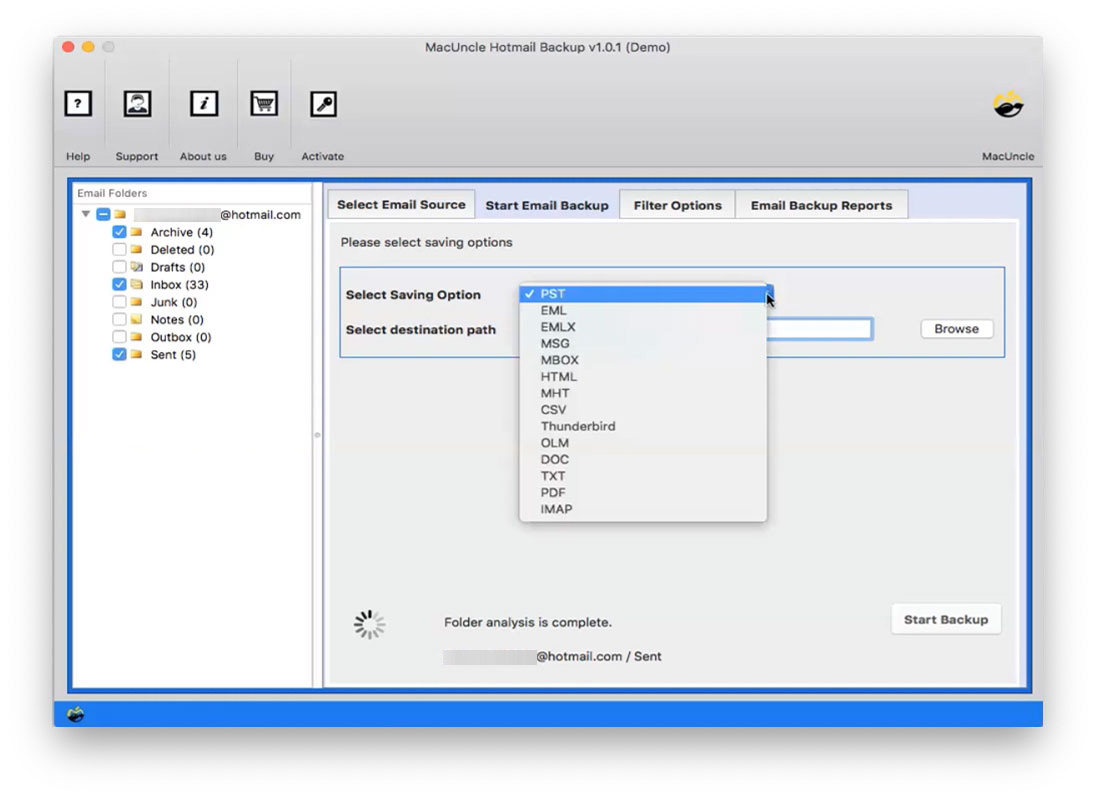
Use the designated toolkit Hotmail Backup, to extract the emails from Hotmail/Outlook.com to the system. It has multiple saving options, from email file format to document file format. At the same time, a user can try to move the emails to another email client directly within the tool itself.
Why Use Software?
The outstanding features of the software make Hotmail stand out. Find out how we can get the emails from the Hotmail account.
- Export Hotmail Emails: With the software, you can export the emails directly to an external storage device. It has the option to back up as many emails from the account.
- Multiple Saving Options: This will export emails into several formats like PST, MBOX, EML, MSG, PDF, and many more for compatibility with other email services.
- Date Range Filter: Using the advanced filter option will take a backup of the email between the specified dates. Only emails for that date range would be pulled for the tool by the user.
- Selective Backup: You can save selective emails according to folders by providing an option of folders or directly choosing the emails in the selective backup.
- Maintain the Folder Structure: A restore of the backup will again retain your original folder structure and Hotmail account.
FAQs
Q) Is Hotmail still active in 2026?
A) Yes, Hotmail is still active, and it was rebranded as Outlook.com in 2013.
Q) Can I still access my old Hotmail account?
A) Yes, use the old Hotmail account by logging into Outlook.com with the Hotmail email address and password.
Q) Is Hotmail the same as Outlook?
A) Partially. Hotmail and Outlook.com are the same service. Your @hotmail.com email address still works exactly as before, but you log in at outlook.com. However, Outlook also refers to Microsoft Outlook, the desktop email application included with Microsoft 365.
Q) What happens to my Hotmail emails if I don’t log in?
Microsoft may deactivate inactive Hotmail/Outlook.com accounts after 2 years of inactivity and permanently delete them. Here is what happens:
- After 1 year of no activity, Microsoft sends warning emails to the recovery address.
- After 2 years, Microsoft marks the account inactive and may delete it.
- Once deleted, all emails, contacts, and calendars are permanently lost.
- The @hotmail.com address is eventually released and can be claimed by someone else.
To keep the Hotmail address active, log in at least once every 12 months. If there are any important emails, it is strongly recommended to back up locally using the mentioned tool or Email Backup Software before the account goes inactive.
Q) Why can’t I access my Hotmail account on Apple Mail?
A) There could be several reasons for this, such as technical issues and configuration settings in Apple Mail. Refer: Why is Hotmail not Working on my Mac?
Q) How do I clean up the old Hotmail account?
A) Use Outlook.com to get access to the account and delete all the emails. Otherwise, use the steps mentioned here: How to Clean up Hotmail email?
Conclusion
Hotmail itself may be old news nowadays, but by name, far from forgotten. It still lives on through Outlook.com to carry the outlook.com population, whose user numbers have grown to serve hundreds of millions of users worldwide. Hotmail still exists and continues to help users manage their emails seamlessly through Outlook.com under Microsoft’s updated platform.