Yahoo Emails Disappeared from Inbox: Causes, Recovery Methods & Prevention


If you are a regular user of any email client, you might have experienced a situation where you couldn’t find that important email in Yahoo. It is one of the frustrating hassles that the user may encounter. Therefore, we will help you find the right solution to “Yahoo Emails Disappeared from Inbox”.
Often, we face such issues due to various reasons, which might be a simple one that is accidentally attributed to a major server issue. Therefore, we will go through all the troubleshooting methods to find the solutions. Moreover, you will take precautions and steps to avoid such a mishap in the future.
Why did Yahoo Emails Disappear from the Inbox Folder?
Here are some of the common reasons why the Yahoo Inbox email disappears from the account:
- Account Settings: Any account settings that have been updated can be unintentionally archived, deleted, etc.
- Syncing Issue: The issues might also be in the syncing, as the logging problem when using different devices might lead to Yahoo Emails disappearing from the Inbox.
- Server Problem: At times, server problems or renovation work by Yahoo may cause the emails to fail over. More importantly, the temporary disappearance of emails from the Yahoo Inbox.
- Yahoo Mail Filter: This email service includes strong filtering options like any other email client. It would automatically categorize the incoming emails into folders like “Inbox”, “Spam”, “Trash”, and custom folders. Thus, sometimes, unwanted emails would end up automatically in these folders.
These are the common reasons why users email from Yahoo accounts. Now, let’s see how to recover the disappeared emails.
Quick Fix: Try This First (60-Second Method)Before we dive into the full troubleshooting list, run through the quick check here; it usually fixes the issues for most users.
- Open the Trash and Spam folders and confirm the emails aren’t in there.
- Type the sender’s name or keyword from the subject line into the search bar.
- Refresh the page or log out and log back in, as it could be a temporary sync issue.
If none of this shows the missing emails, continue to the full recovery steps below:
How to Recover Yahoo Emails Disappeared from Inbox?
We have a bunch of options to recover Yahoo mail gone from the Inbox. From here, you will also get what caused the missing Yahoo Emails from your Inbox.
- Examine Other Folders: First, analyse all the folders of the Yahoo Mail account, including Trash, Spam, and any other custom folders. There could be a chance of accidentally moving emails from one folder to the other.
- Review Settings and Filters: Go through the Yahoo Mail settings, the email filters, and all other settings. Ensure that any filters are set to routinely delete or redirect emails to save storage space.
- Check the Syncing option: If you get admission to Yahoo Mail from a couple of devices or e-mail clients (which include Outlook or Apple Mail), verify that each gadget is syncing correctly. Try logging out and logging back into your Yahoo account on every tool to refresh the connection.
- Check the Search bar if Yahoo Emails Disappeared from the Inbox: You can use the Search bar in Yahoo Mail to search for specific missing Yahoo Emails from your Inbox. If you know the sender’s name or anything associated with the missing emails, then enter it into the top search bar. Sometimes, emails might be on the server but overlooked due to the large volume of messages.
- Check the Yahoo Server Status: Visit the Yahoo Web page or any of the respective social media channels to check if there are any updates regarding any related troubles or the Yahoo Mail maintenance activity. If it is a common issue from Yahoo Mail’s end, the email message’s disappearance might be temporary.
- Contact Yahoo Support: As we discussed before, if the issue is from Yahoo’s end, then try connecting with Yahoo Customer Services. Even though there are other underlying reasons, connecting with the customer service to analyse the issue in-depth.
Advanced Methods to Retrieve Lost Yahoo Emails?
- Open your Yahoo Mail account and navigate to the Help Center.
- From the Top right corner, choose the Help button.
- Once you are in the Help Center, search for “Recover Lost or Deleted emails“.

- Now follow the instructions mentioned by Yahoo to submit a restore request.
- Then, you might need to enter the desired field.

- Now, wait for the response.
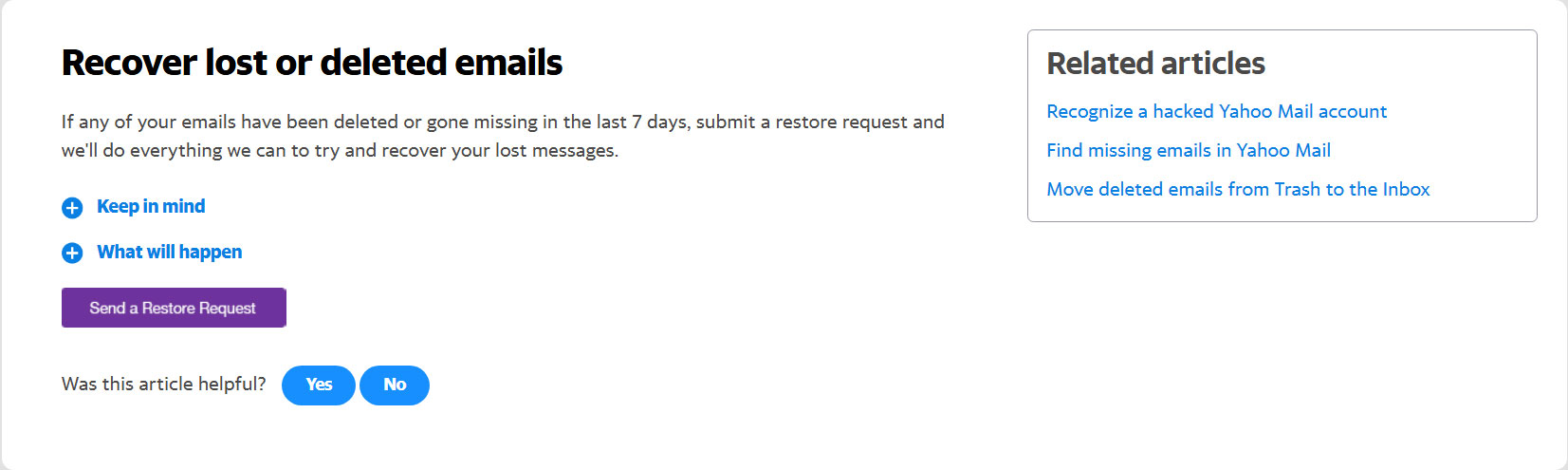
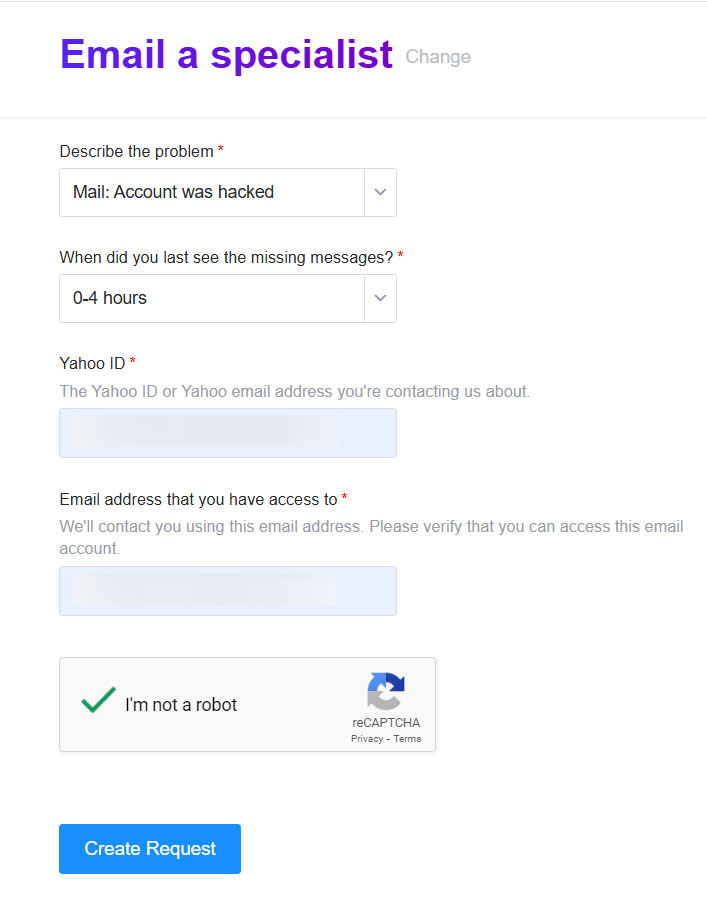
Note: There’s no guarantee Yahoo’s restore feature will solve every issue – for example, deleted emails more than 7 days ago from Trash are unrecoverable without a separate backup.
How to Prevent Yahoo Emails from Disappearing?
Once you recover the missing emails in Yahoo Mail, you can use these preventive methods to ensure this never happens.
- Evaluate your email files and settings regularly to make sure they align with your requirements.
- Avoid the use of any junk mail folders. Only use the one that is required.
- Update the Yahoo account or any modification announced to count on and mitigate capacity issues.
- Monitor your Yahoo storage quota – if your account is close to exceeding its storage, it is more likely you will experience failed syncs and delivery errors.
- Turn on two-factor authentication – if someone else is accessing your account, then they may be moving or deleting email you are unaware of.
Expertise Method to Avoid the Issue – Yahoo Emails Disappeared from Inbox
It is better to have a backup of the Yahoo emails with the Yahoo Mail Backup Software. Regardless of the concern we recommend having a handy copy of the important emails. The toolkit has all the features you need from different saving file formats to choosing a desired location to safely place the backup.
Conclusion
When your important emails suddenly disappear, it is the most infuriating experience. But when we have the right approach, it is possible to recover them swiftly. By systematically troubleshooting the issue or taking preventive measures in advance, you can minimize the likelihood of encountering such concerns in the future. Go through all the reasons first, then use any of the methods to fix the issue.
FAQs
Q) How can I check if my Yahoo emails are still accessible even if they disappeared?
A) First, inspect your “Trash” or “Deleted Items” folder to see if you accidentally deleted emails from Yahoo Accounts. Also, use the search function in your Yahoo Mail account to search for specific emails.
Q) Why did Yahoo emails disappear from the Inbox folder?
A) The reasons could be various, from accidental transfer between folders to server issues. Otherwise, the reasons could be unintended deletion, filter settings, sorting, or technical glitches.
Q) Are there any known troubles with Yahoo Mail that could cause emails to disappear?
A) Occasionally, Yahoo Mail experiences technical issues that could affect e-mail delivery and storage. Check the Yahoo Mail service or network forums to see if there are any similar issues affecting your account.
Q) Does Yahoo delete emails immediately?
A) No. Yahoo generally deletes emails in Trash after 7 days. If you have not deleted the emails, Yahoo automatically deletes them from the Trash.
Q) What is the duration for which Yahoo retains deleted emails?
A) When you delete emails, Yahoo puts them in Trash for approximately 7 days before it deletes them, and they are irretrievable through Trash. Once the 7 days have passed, you can still recover emails by requesting a restore through Yahoo Support.
Q) Will I lose all my emails if I log in to Yahoo from a different device?
A) No. But if that device has its mail client set to “delete from server” after download, your emails can disappear from your Yahoo inbox (this is the default option on Outlook, Apple Mail, etc.) without deleting them. If this occurs after connecting a new device, look at sync settings for all client devices.