How to Open HTML File in Outlook Easily & Quickly?


Lately, if you have been searching for how to open HTML File in Outlook, you aren’t the only one with such a query in mind. HTML files are commonly used to create emails with formatted text, links, images, & other design elements. Opening or viewing such files in the MS Outlook program helps a great deal to verify your email formatting, check your email content, or even comprehend how a mail message has been drafted. In this blog, we will explain some methods for opening HTML content in the MS Outlook email program. Read this to the end to discover all such available ways so that you can pick the best one as per your specific needs.
Most people tend to be unaware that each email has an underlying code. Just as a web page, an email also depends on HTML for defining its appearance, text formatting, image placement, and hyperlinks. Such situations necessitate examining the code to better understand how that mail message had been structured. Irrespective of your very purpose, knowing how to open an HTML File in Outlook is always a valuable thing for all users who have been working with emails all this time.
Let’s now check out some available ways to carry out this simple task of opening an HTML file in Outlook.
How to Open HTML File in Outlook Manually?
A highly simple way to open HTML file in Outlook is to save the required email as an HTML file. Such an approach doesn’t need you to have any 3rd-party apps. For this, you can follow the steps mentioned below:
- Launch the MS Outlook program.
- Open the email by double-clicking on it.
- Select the option of File.
- Click Save As from the available menu.
- In the Save As dialogue box, locate the Save as type field, select HTML.
- Select a destination folder.
- Click the Save button.
- After saving the email as an HTML file, navigate to the location on your machine where it was saved earlier.
Also, you can right-click the file and then select Open With > Notepad for viewing the raw HTML code. Alternatively, you can double-click on the file to launch it in your default web browser and then press Ctrl + U from your keyboard. Such an action will also display the whole source code in a separate tab, which will allow you to review/copy the content, as per your requirement.
Challenges When Opening an HTML File in Outlook Manually
Though manual ways of saving your emails as HTML files could be helpful, these pose certain challenges as well, as follows
- Bulk migration functionality is not available. So, just a single email could be processed at a given point in time.
- It is hard to manage large sets of emails as this process becomes cumbersome.
- You will witness that the original folder hierarchy won’t be maintained.
- Some HTML files might show up wrongly or may lose embedded images.
For people who have been managing multiple HTML files or several email messages together, the manual ways might not give a great experience.
Pro Solution to Convert HTML Files into Outlook-Supported Formats
When any user needs to view multiple HTML files in the MS Outlook program without any challenges, the HTML Converter comes to offer a really practical solution. This is a professional utility that enables you to convert HTML files into Outlook-compatible formats such as EML/MSG, etc., making it very comfortable for you to open HTML file in Outlook and manage it well there. This tool is designed in such a way that it preserves the original structure as well as formatting of HTML files while still ensuring seamless compatibility with Outlook-supported formats.
How to Open HTML File in Outlook Account?
Do you wish to know how to view an HTML file in Outlook? Well! Using this software is super simple as well as pretty straightforward. You just have to follow a few simple steps below:
- Add HTML files using the Add Files/Add Folder options.

- Choose the PST file format to open HTML file in Outlook.
- Define a destination location to save the converted file.
- Finally, begin the conversion by clicking on the Export button.
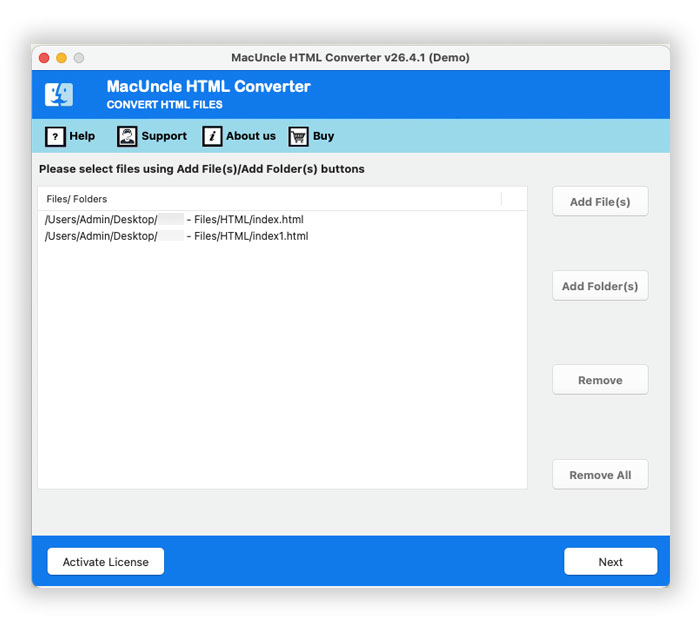
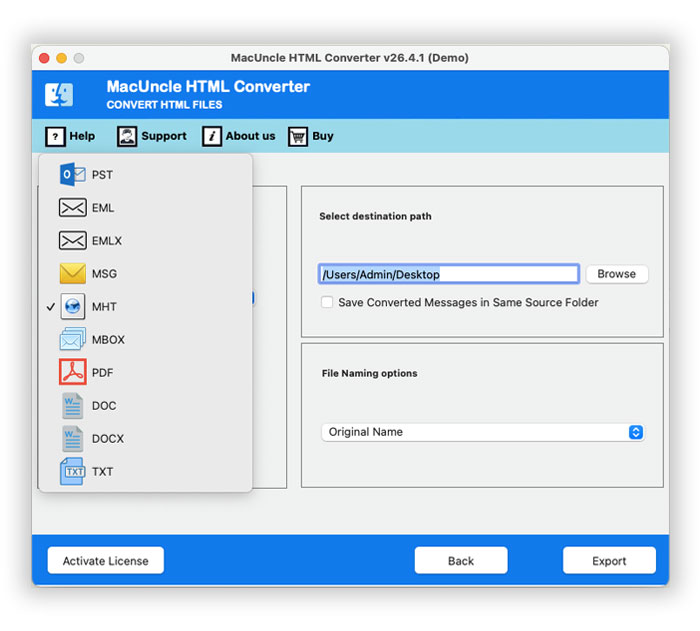
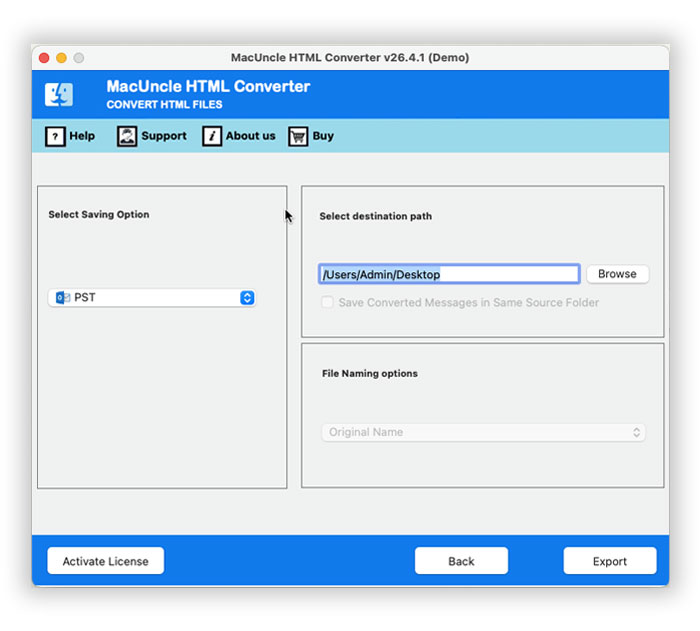
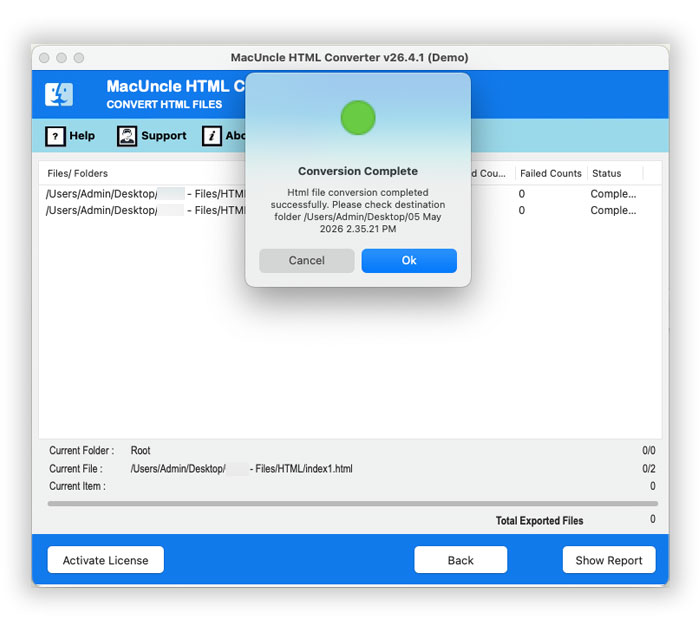
After carrying out this conversion, you can very comfortably open the resulting files in the MS Outlook program without any such compatibility issues.
FAQs
Q) How do I see the source code of an email in Outlook?
A) You can save the email to an HTML file using the Save As option in Outlook. Open the saved HTML file in Notepad or view its source code directly in a web browser.
Q) Can Outlook import bulk HTML files?
A) Not directly. Users with multiple HTML files must get the specific converter to import them into the Outlook application.
Q) Which is the best format to convert HTML to Outlook?
A) Generally, EML, MSG or PST are the best Outlook-compatible formats for converting HTML, and users can convert HTML formats to import them into Outlook.
Q) Can I convert HTML to Outlook format with Outlook?
A) Yes, convert HTML files to PST format using the tool without the installation of the Outlook application. Use the toolkit on a Mac machine and convert multiple HTML files at once.
Q) What are the file size limits when I convert HTML files?
A) Most professional HTML conversion software can easily convert large HTML files without any restriction on the size of the HTML files. It can also carry out bulk conversion of many HTML files without limitation on the size of each HTML file.
Conclusion
You now have a good amount of know-how about how to open an HTML file in Outlook. You checked out 2 different approaches here. One is the manual approach, and the second is the professional intervention. You have to decide which one works best in your case, specifically by gauging your requirements and evaluating the best-suited features applicable in your situation. More or less, the pro solution is used by hundreds as it is free from any such operational challenges. Also, successful results are guaranteed in the pro solution, so people usually make their choice accordingly.