How to Convert HTML to TXT File Using Proven Ways?


In this present age, web pages, mail archives and offline pages are usually in HTML format. However, there are many cases when users desire to retrieve the text information from an HTML file and save it as plain text format, in order to fulfil the purposes of documentation, content analysis, archive and data processing. Even though manual conversion of a few files is not a challenge at all, batch conversion will take too long when a vast number of HTML files are available to convert.
In this article, you will find how to convert the HTML files to TXT format manually and use a professional method to batch convert them. We also make a contrast between HTML and TXT, and introduce an effective method to batch convert lots of HTML files and retain the original content well.
What Are HTML to TXT Files?
Most people wish to convert HTML to TXT file format for various purposes. However, before proceeding, it is significant to comprehend the difference between the HTML file format & TXT file format.
HTML Format: HTML happens to be a markup language that is utilised for building webpages. Web browsers could interpret and display these HTML files. This file format actually makes use of tags for creating web content. Via these tags, people could add text, tables, headings, images, & many other such elements. HTML tags could even work besides additional markup & styling languages like PHP & CSS.
TXT Format: TXT happens to be a plain text document format. As TXT files don’t have any formatting, almost all apps can open & support these. Also, TXT files tend to have only ASCII characters, so this makes them highly compatible with almost all devices as well as operating systems.
Manual Execution to Convert HTML to TXT
If you wish to manually convert HTML to TXT format on a Windows computer system, you can undertake the following steps:
Start by Opening the Required HTML File.
- Right-click the required HTML file
- Select the Open With option.
- After that, use any browser to open the file.
Proceed by Printing the HTML File:
- Now, use the Print feature to open the print dialogue box.
- Choose Adobe Pro to convert to the TXT Format.
Finally, Convert HTML Files:
- The file will open in Adobe Pro.
- Next to this, you now need to click the ” Convert ” option.
- Select To Text for converting this HTML file into plain text format.
Alternatively, you can even select the option of “To RTF” if you wish to form a rich text file.
Best Way to Convert HTML to TXT Format
You can perform this conversion with ease in an efficient pro solution. The manual procedure is not that efficient for HTML to TXT format conversion. Therefore, a dedicated software tool has been developed for the export of an HTML file to TXT format. HTML Converter could be utilised to all the extent for resolving the majority of users’ requirements. This excellent tool can directly convert HTML file to TXT format without any issue. Try the conversion with the demo version from the links below:
What are the Features of the Tool
This simple-to-use software provides multiple advanced functionalities, including:
- You can easily convert multiple HTML to TXT files, all in one go, by processing numerous *.html & *.htm files at the same time.
- It is possible to convert HTML files on Mac into PDF/MBOX/EML/MSG & other formats too.
- The software preserves all formatting elements like hyperlinks, inline images, tables, & even CSS styles.
- The tool can convert HTML archives of any size & quantity whatsoever without any such size limitations.
- There is no additional app or plugin needed for completing this task. It is that simple!
How to Perform Batch HTML to TXT Conversion in 4 Steps?
Follow these simple instructions to batch convert HTML to TXT format with sheer ease:
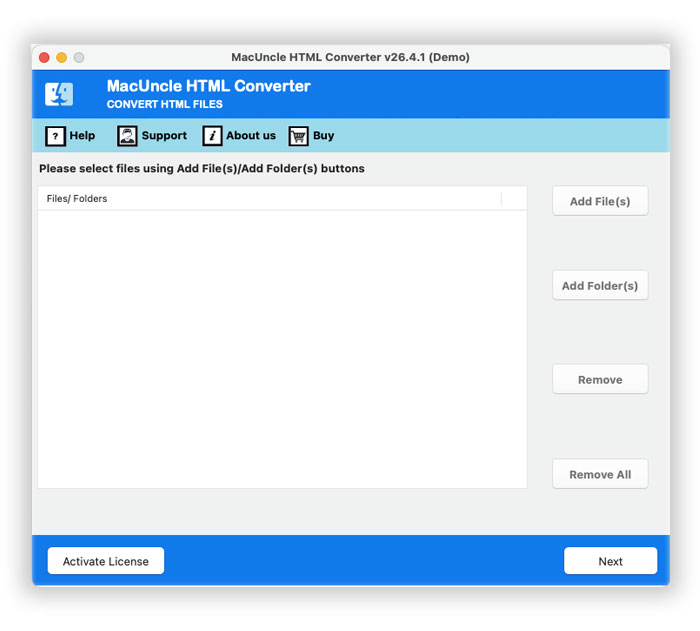
- Run the HTML to TXT Conversion Tool

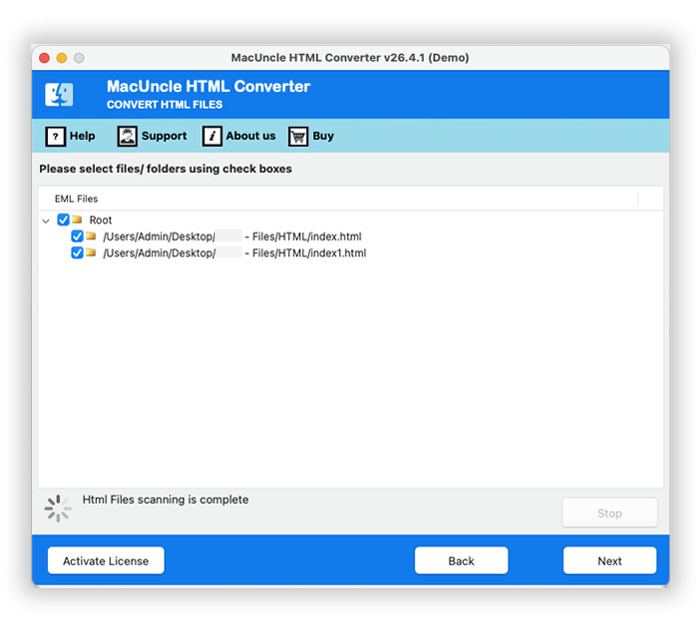
- Use the Add File/Add Folder to add the HTML files.
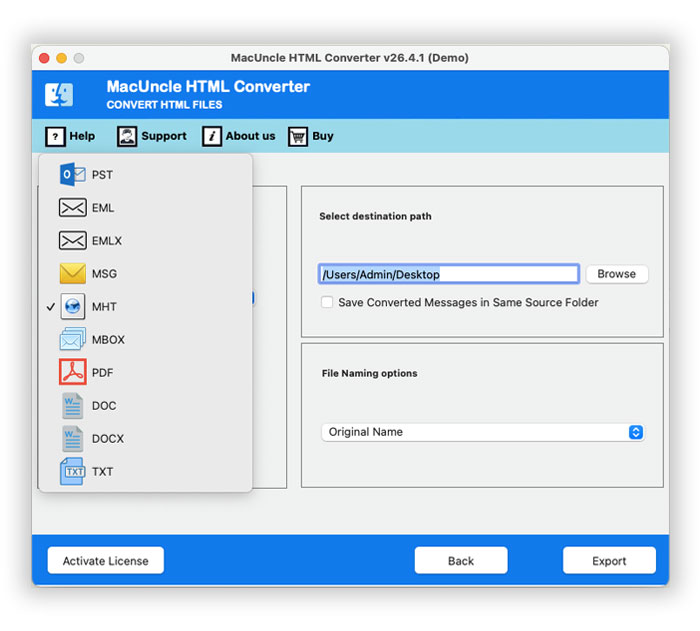
- Now, select an Output Saving Format: TXT.
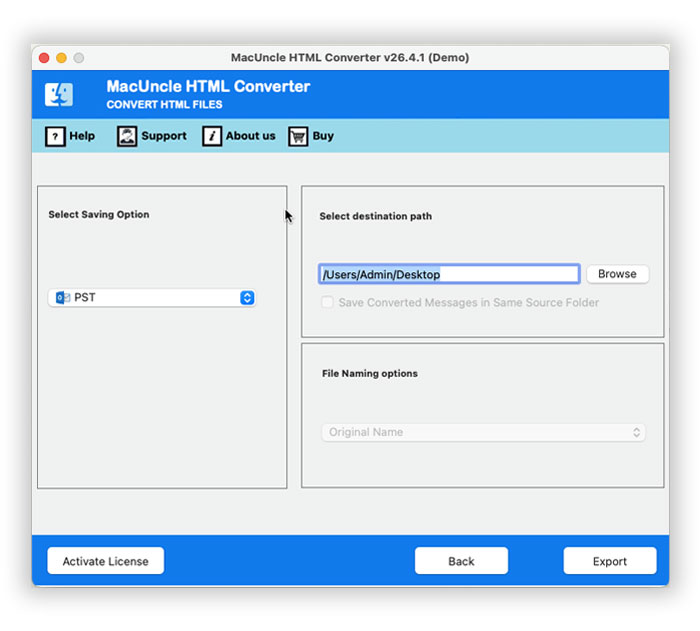
- Define a Destination Path.
- Finally, start the Conversion
Check out related articles:
Recapping the Thoughts
In this blog, we discussed how to convert HTML to TXT file using both the manual way and the professional approach. These days, with such busy lifestyles, most people search for easy ways to undertake tasks on their computer systems. Patience levels are shrinking too! Expertise and perfection are sought after, at the end of the day! So, in light of all this, we can say that the professional tool suggested here would solve your purpose better than the manual way.