How to Unlock Password Protected PST Files on Mac OS X?


Are you an Apple user with a bunch of encrypted PST files? Want to unlock password-protected PST on Mac, then do not worry. Let’s find out the best possible method to take out the passwords from PST files.
We all encrypt our data files and might end up forgetting the common password. However, finding a solution to eliminate passwords is not an easy task.
Yes, using an online service for any email file-related issue is not a good approach. And you will not get support from Microsoft if you forget your password. Therefore, MacUncle has come up with a solution to unlock password-protected PST files on macOS. Read the complete article to know more about the tool.
Unlock Password Protected PST Files on Mac OS
PST Password Recovery is a tool with a simple graphical interface that allows users to decrypt PST files. Users with Outlook Data secured with a password can be accessed by removing the password without any hassle. Use the tool to take out the passwords from multiple Outlook PST files.
Outlook uses three different types of passwords: Compressible, High, and None. All types of passwords can be eliminated from PST files using the mentioned tool. Get the upgraded version to unlock all Outlook PST files without any limitations.
How to Unlock PST File within 3 Simple Steps
The tool is designed for users from naïve to experts. Therefore, the procedure is straightforward. Start by launching the tool on the latest Mac edition.
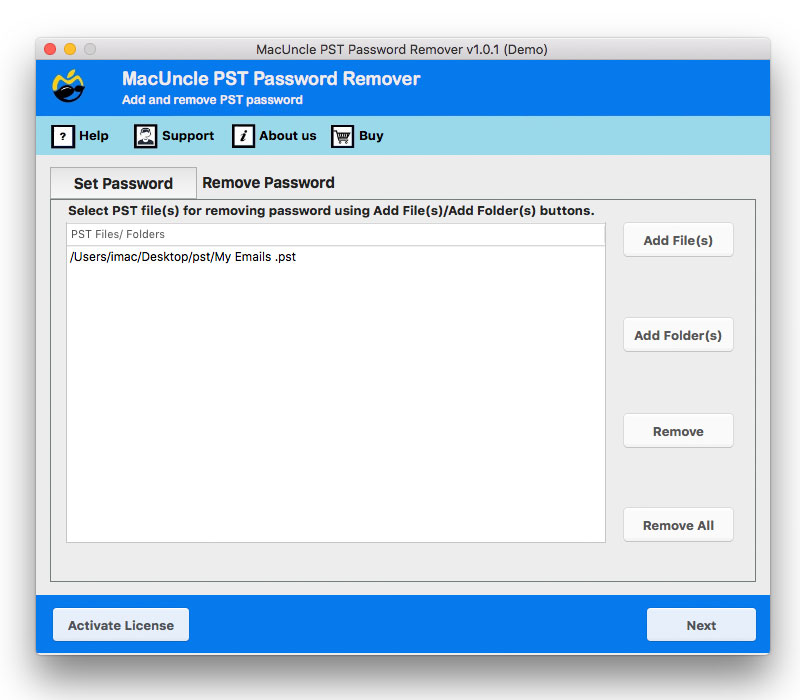
- Firstly, click on the Remove Password button in the top menu. Then, perform the next step.
- Add password-encrypted PST files to the software panel using the Add button. Press the Next button.

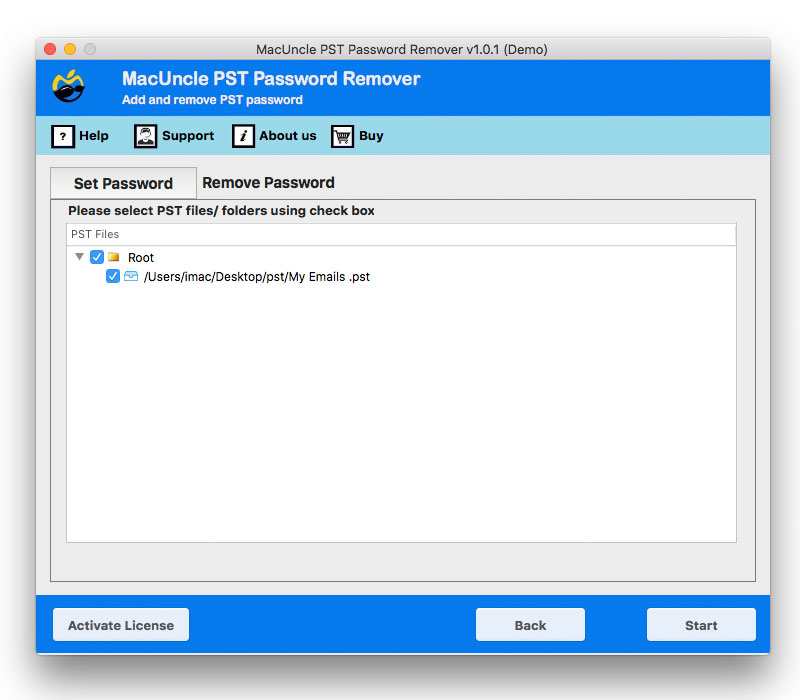
- The software will take you to a new tab with the option to select the required folder/subfolder. Click on the corresponding check box.
- However, you must have the professional version to unlock password-protected PST files.
Learn the steps to Export Outlook Calendar to Excel Mac.
Why is it best to Unlock Password Protected PST Files?
From the above steps, it is clear that the tool possesses a simple procedure with a user-friendly interface. Here are some other features of the tool:
- Compatible with All Outlook PST Data: All the *.pst files are supported by the tool. The data was exported from Outlook 2016, 2013, 2010, 2007, 2003, and 2000.
- Standalone Application: To perform the password removal procedure, there is no requirement for any external application, such as an Outlook installation. Unlock password-protected PST files on Mac.
- Unlock batches of PST Files: Add single or multiple files or complete folders to the software panel. Altogether, in batches, take out the protection from the Outlook PST on Mac.
Conclusion
In final words, the blog has a trusted solution for Mac users. Unlock password-protected PST files on Mac OS. As there is no manual method to unlock the PST files, use the automated method to get access and open PST Files without Outlook on Mac.